
18 Essential Features of E-Learning Platform That Convert Visitors into Paying Students

TL;DR
- Core Features: Prioritize must-have features like course management, robust search tool & filtering, payment & monetization flows, performance analytics, reporting and mobile-first approach. For tutoring platforms, live classroom, interactive learning tools like whiteboards, session chats and screen sharing are important.
- Social Learning Tools: Discussion boards, peer-to-peer learning groups, and membership communities enhance collaborative learning.
- AI Competitive Edge: Modern learning platforms include AI features, such as adaptive learning, recommendations, automated content creation, learning assistant, predictive analytics, and translation services to offer personalized learning experiences.
- Strategic Implementation: Skip building all the features from scratch with pre-built e-learning softwares like Pinlearn and launch a tailored e-learning solution.
Planning to build an e-learning platform? Whether you’re building a course marketplace or a tutoring website, the success of your platform depends on its design and functionality.
Different types of learning platforms demand a unique set of essential features. Hence, the right set of features depends on your platform goals, target audience and business model.
Another challenge for feature selection is deciding which features are necessary. While too many features can overwhelm users, too little features fail to impress the audience. Budget considerations and user experience are other significant factors.
On that note, let’s look at the key features of e-learning platforms to boost engagement and revenue!
Essential Features of E-Learning Platforms for Businesses
Here’s the complete feature list for e-learning platform development:
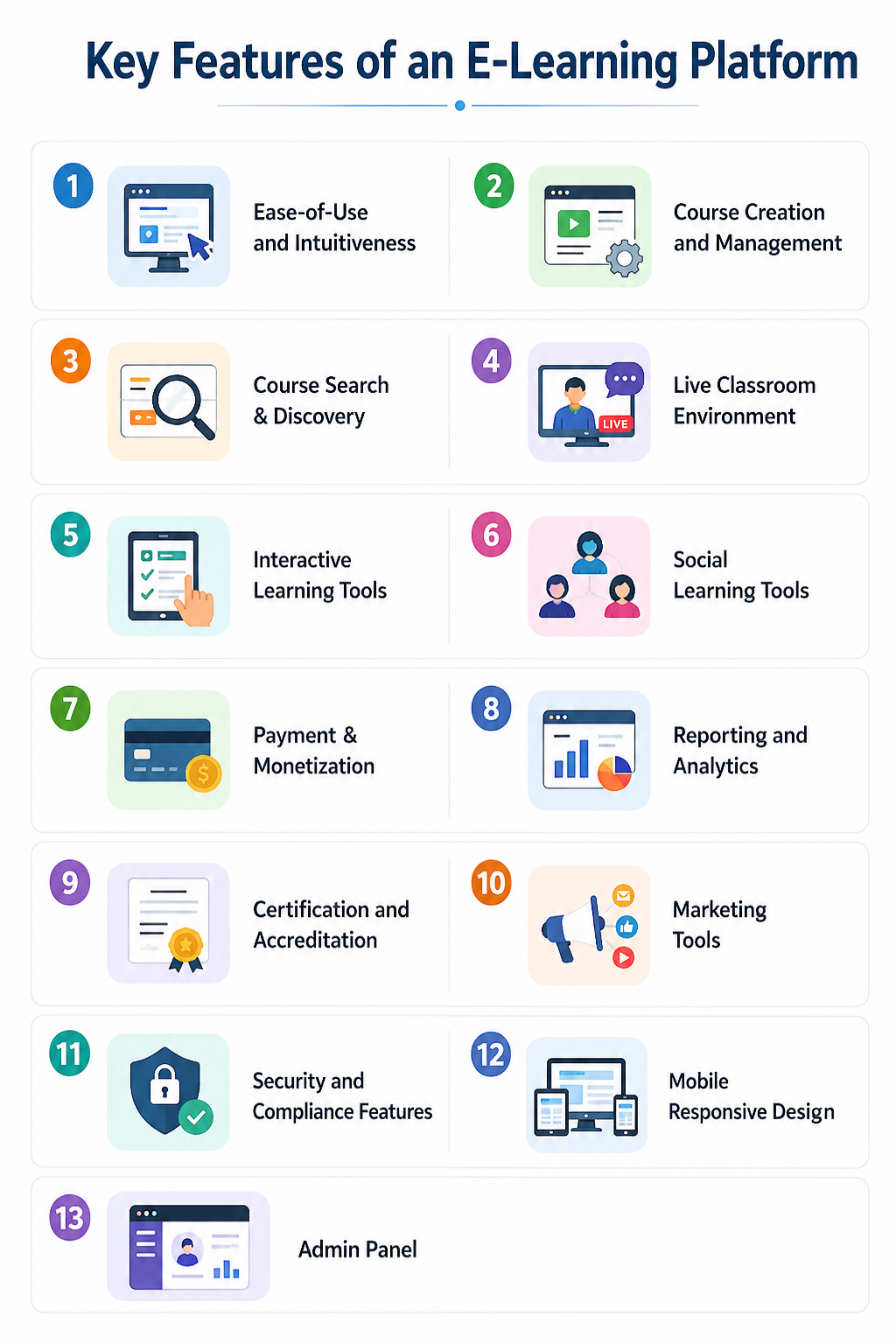
1. Ease-of-Use and Intuitiveness
A user-friendly and easy-to-navigate platform makes a good impression on new visitors. With the reduced attention span of learners, students are less likely to spend time figuring out the platform. Hence, it’s crucial to offer a seamless platform experience right from onboarding to course completion.
A simple and learner-centric platform includes:
- One-step login
- Easy course navigation
- Clean and clutter-free dashboard
- Step-by-step onboarding for new learners
An accessible interface makes it easier for learners to grasp concepts and meet their learning goals.
2. Course Creation and Management
Effective content creation and management are an integral part of e-learning platforms. Empower educators to create and upload engaging lessons, slides, and quizzes, using easy, drag-and-drop tools. Allow them to create and organize the course lessons in a modular format.
Ensure your course builder supports:
- Pre-built templates and course layouts
- Content types such as videos, slides, downloadable resources,etc.
- Interactive quizzes, assignments and simulations
- Content drip management
A powerful course management system speeds up course creation and provides an engaging learning experience to students.
3. Course Search & Discovery
For students, finding their preferred course from an extensive library of courses is tedious. A robust search tool with filters for category, price, level, language and ratings makes search easier.
Platforms can group courses based on different categories and formats. Filtering helps users narrow down their search and choose their preferred course quickly. The search functionality matches the keywords to the course description, title, price, and other details, providing a list of relevant courses users are looking for.
4. Live Classroom Environment
A real-time learning environment simulates traditional classrooms and makes learning engaging and interactive. Students can book live lessons with their preferred instructor as per their availability and subject expertise. Synchronous learning helps students to grasp concepts with real-life scenarios, examples, and activities.
A high-quality virtual classroom includes:
- Virtual whiteboards
- Breakout rooms
- Private chats, polls and session recordings
- Screen sharing and content sharing feature
Personalized or group classes ensure learning is not just a one-way discussion and foster an inclusive and collaborative environment.
5. Interactive Learning Tools
The best e-learning platforms keep students engaged through their learning journey. These tools improve retention, encourage collaboration and even provide quick feedback to learners. For example, a learning assistant on a Duolingo-like platform provides feedback on pronunciation and spelling and helps with roleplay scenarios.
Top interactive tools to include are:
- Live discussion forums
- Quizzes and assessments
- Gamification features like points, badges, and streaks
- Multimedia integrations like diagrams, animations and simulations
Such tools encourage active student participation, problem-solving and critical thinking.
6. Social Learning Tools
Building a collaborative learning environment packed with group discussions, projects, and peer feedback enhances learning outcomes. Students and subject experts can share their knowledge, brainstorm, discuss trends, project ideas and build a strong learning community.
Top social learning features shaping future learning are:
- Discussion boards
- Peer-to-peer learning groups
- Live events and member groups
- Membership communities with feed, courses, and Discord access
Social learning tools are useful aids for learners seeking mentorship, face-to-face interactions or diverse learning experiences.
7. Payment & Monetization
A secure payment infrastructure and monetization setup drives revenue to the platform. First off, the monetization and payment features depend on your business model. For instance, a subscription-based e-learning platform includes tiered pricing, content delivery features, autorenewals and upselling features.
Key monetization features:
- Subscription management
- Multiple payment methods such as credit/debit cards, wallets, regional payment methods, PayPal, BNPL
- Multi-currency support & region-based conversion
- Secure checkout, upselling and cross-selling
Integrate with trusted payment providers like:
- Stripe
- PayPal
- Authorize.net
- Square
Subscriptions, individual courses, certification fees, product upsells, and corporate licensing are popular e-learning revenue models.
8. Reporting and Analytics
User analytics provides data-driven insights on course progress, engagement, assessment scores, etc. This helps educators to understand if students are able to achieve their learning goals and optimize their teaching strategies accordingly.
Modern LMS and e-learning platforms come with:
- Performance dashboards
- Course analytics such as completion rates, enrollments, drop-off points,etc
- Automated grading & score tracking
- Custom reporting tools & earning analytics
Tracking the learning metrics helps to identify patterns, offer extra support to specific students and address learning gaps.
9. Certification and Accreditation
Certifications are digital credentials that show course completion and validate learner skills. This helps with career development and is a part of training programs. Platforms like Coursera and Docebo provide globally recognized or professional certificates on course completion.
So, how can you provide certifications through your learning platform? E-learning platforms can include an LMS with certification tools, use LMS plugins or integrate third-party APIs. Most e-learning platforms offer downloadable templates that can be easily customized. You can change the background image, add the student name, image, course title and completion date or even auto-populate the details.
10. Marketing Tools
Built-in promotional tools help to maximize course visibility and sales. Educators can use these tools to promote their courses outside the platform or even attract new users. Platforms like Udemy, Coursera and even SaaS platforms such as Thinkific and LearnWorlds offer marketing capabilities.
Promotional features include:
- Coupons, seasonal discounts and flash sales
- SEO options like custom URLs, meta tags and descriptions for organic visibility
- Referral programs with unique links, cash or credit incentives
- Welcome sequences, email promotions, and course completion reminders
Enabling course creators to promote and sell their content generates leads and enhances brand authority.
11. Security and Compliance Features
E-learning platforms must prioritize content security and user privacy to protect from unauthorized access. Strong security controls prepare your platform for sudden breaches, malware attacks and data misuse.
Must-have security controls include:
- Data encryption at rest and transit
- SSO & 2-factor authentication
- Audit logs & fraud monitoring
- Instructor verification workflow
- Content moderation & communication safeguards
Review and moderation flows help to build a safe learning environment as per standard content guidelines. Introduce real-time monitoring across chats, forums, and assignment submissions to safeguard students from sensitive topics and harmful content. Additionally, e-learning platforms must comply with GDPR, FERPA, and CCPA for data protection mechanisms.
12. Mobile Responsive Design
Adopting a mobile-first approach is crucial to cater to the rising number of mobile learners. A mobile responsive design offers a seamless learning experience from desktops, smartphones and tablets. Design for the smaller screens first, then later on adjust the interface for larger screens.
Best practices for mobile responsive screens are:
- Scalable grid layouts
- Touch – friendly interface design with large buttons and fonts
- Accessible navigation, hamburger menus and bite-sized learning
- Optimize page loads with image and media compression
Mobile-first platforms offer an accessible, smooth and productive user experience across all devices.
13. Admin Panel
The admin dashboard is the central hub to manage learners, instructors, content and platform revenue. It enables platform owners to keep track of the e-learning business and gain data-driven insights to streamline efforts in the right direction.
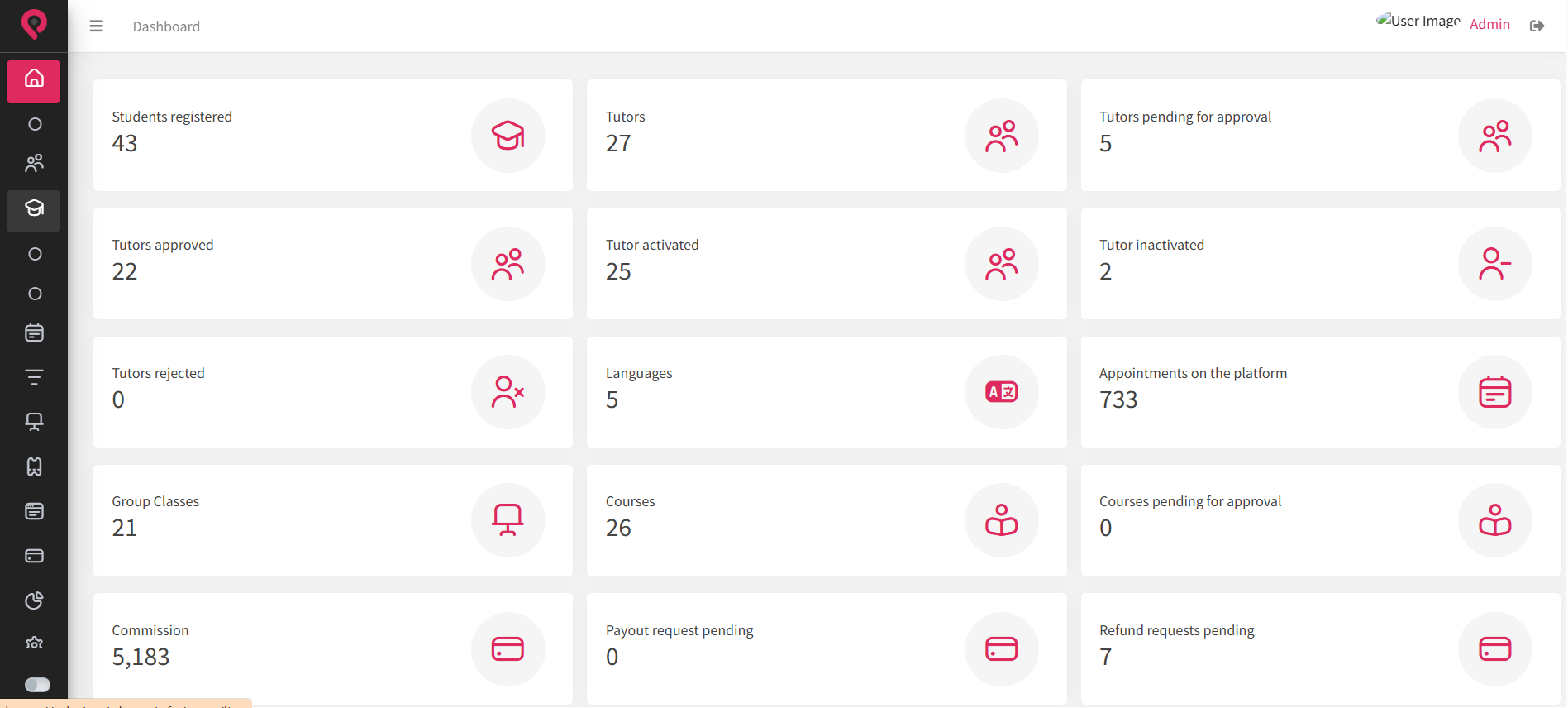
Admin dashboard helps to manage:
- Active and registered students and instructors
- Learner progress tracking
- Course performance
- Moderate uploaded course content
- User credentials & activity logs
- Platform & brand settings
- Earning & commissions analytics
- Instructor payouts
AI-Powered Features
AI is a game-changer for e-learning platforms. It helps to automate course creation, offers personalized learning experiences, or even serves as virtual learning assistants.
Here are the different AI features adding value to e-learning platforms:
1. Adaptive Learning & Content Recommendations
Adaptive learning tools provide learning resources based on learner performance and engagement. For example, if a learner prefers video content over text, an AI tool can offer video resources. Another example is if a student attempts a language test and scores less in vocabulary, AI can recommend vocabulary lessons or practice tests.
2. Automated Content Creation
Educators can speed up content creation by involving AI to generate quizzes, flash cards, outlines, lessons, or case studies. Several course authoring tools support automated content generation by creating learning content based on specific prompts. By automating content production, you can reduce manual efforts and launch courses faster.
3. Predictive Analytics
AI can track learner activity and performance, offering valuable insights to support well-informed decision-making. This helps measure the effectiveness of training programs, identify areas for improvement and enhance learning outcomes.
4. Intelligent Tutoring Systems
Learning assistants and intelligent systems answer learners’ questions or offer personalized guidance. This motivates students to achieve their goals and keeps them engaged on the platform. Smart agents or assistants also help educators with repetitive administrative tasks, allowing them to focus on lesson preparation and other strategic tasks.
5. Language Translation and Localization
AI tools provide real-time language translation, making your course content accessible to a global audience. Besides, AI-powered tools also make content accessible to people with hearing or visual impairments.
Conclusion
Choosing the right platform features depends on your functionality, engagement, and planned budget. Feature selection is not about blindly replicating all the features of popular learning platforms. You need to add your own unique features that would engage learners and retain them longer on your platform.
At Pinlearn, we specialize in building modern e-learning platforms for businesses with all the essential features. So, if you’re struggling to find the right platform features, our pre-built e-learning software helps to skip the research and groundwork and still build a powerful platform foundation. Our team of experts helps to build a tailored e-learning platform aligned to your niche and branding needs.
Connect with us today to learn why successful e-learning platforms choose Pinlearn, and also take a look at our product demo to understand the features we offer!
Further Reading:
FAQ-Related to Features of E-learning Platforms
1. What are the key features of online learning platforms?
Content creation and management, LMS integration, course discovery, progress tracking, payment integration, analytics, reporting and mobile-first approach are the essential features for e-learning platforms.
2. What is the development cost to create an e-learning platform?
E-learning platform development takes $30,000 to $1,00,000+ for building all the features from scratch. Using e-learning clone scripts reduces the cost significantly to $700 to $1500 for MVP development.
3. What are the important security features to include in an e-learning platform?
Single Sign On, data encryption, SSL certificates, role-based access and secure payment gateways are top security features of modern e-learning platforms.
4. What are the AI-features that can enhance e-learning platform experience?
AI content recommendations, adaptive learning, learning assistants, generative course authoring and predictive analytics are the top AI features.
5. What is the time required to develop an e-learning platform?
Building your e-learning platform from scratch takes around 4 to 12 months, while e-learning clone scripts help to launch your platform within 5-6 days.
6. How can I add live classes to my e-learning platform?
Integrate with third-party video conferencing tools like Zoom, LessonSpace, and Google Meet for building an interactive virtual environment.