
How to Create an E-Learning Platform: Step-by-Step Guide
TL;DR
- E-Learning Development Process: Start by defining your platform concept and niche, research your audience and competitors, pick a business model, curate a user journey, choose the right development approach, integrate website components, then launch, and market your platform.
- Key Features: Core features include secure login, content management, video conferencing, LMS, progress tracking, communication tools, payment & monetization setup, admin panel, and analytics.
- Technical Infrastructure: Integrate hosting server, video hosting, LMS, security, development frameworks, analytics, and security controls.
- Ready-Made E-earning Clone Scripts: Entrepreneurs choose pre-built e-learning software to launch an e-learning platform at 50% lower cost (i.e. $700 – $1500 for MVP platform) within 5-6 days.
Businesses are tightening development budgets and exploring ways to launch their platform faster. As technology evolves, optimizing software spending doesn’t just mean finding cost-effective alternatives, but leveraging intelligent solutions that support scalability and branding needs.
This blog on how to create an e-learning platform focuses on one such practical approach with pre-built solutions such as Pinlearn. We’ll break down the key features, detailed steps, real-world examples, and best practices to launch a successful e-learning platform.
What is an E-learning Platform?
An e-learning platform is a software solution to create, manage, and track learning content and build an interactive environment where learners progress. It provides content creation tools, forums, video conferencing, whiteboards, and assessments to facilitate learning.
The marketplace or educators delivers courses, training programs, degrees, live workshops, and webinars through the platform. An effective e-learning platform adapts to different learning styles, integrates social features and is built on mobile-responsive design.
Types of E-Learning Platform:
- Course Marketplaces (MOOCs): Learning hub where multiple instructors publish and sell thousands of courses, focusing on self-paced learning.
Examples: Udemy, Coursera, edX
- Tutoring Websites: Online platforms connecting students with personal tutors through live conferencing for academic help, test preparation, or professional skills.
Examples: Preply, Varsity Tutors, Tutor.com
- LMS: Used by schools and organizations for creating, managing, and tracking learning resources.
Example: Moodle, TalentLMS, Docebo
- Language Learning Apps: Interactive online platforms designed for language learning through game-like lessons, quizzes, or daily challenges.
Example: Duolingo, Babbel
- Technology Upskilling Platforms: Online platforms for certification and professional programs in programming, web development, artificial intelligence, etc.
Example: Udacity, Datacamp, Codecademy
- Social Learning Platforms: Digital learning platforms facilitating community-building, peer-to-peer interactions, and knowledge sharing among learners, experts, and instructors.
Example: Disco, Maven, Circle
Key Features of an E-Learning Platform
The right feature stack empowers the success of your e-learning platform. Identity essential features based on the type of e-learning platform, audience, instructor needs, and platform goals. Start building an MVP; later scale with advanced features.
Must-Have Features
- Login and Registration: Allow users to create a new account using email or social login.
- Content Creation and Management: Provide tools to create, edit, and organize lessons, quizzes, assessments, and resources.
- Live Classroom: Integrate video SDKs like Zoom and LessonSpace, along with interactive whiteboard tools, screen sharing, chats, and session recordings.
- Progress Tracking: Enable learners to track progress with visual indicators to show course completion.
- LMS Integration: Central hub for creating, managing and tracking educational courses and programs.
- Communication Tools: Include discussion forums, collaborative learning spaces, and doubt-solving channels.
- Payment & Monetization: Generate revenue from course payments, certificate fees, subscriptions, and corporate partnerships, supported by secure Stripe and PayPal integrations.
- Analytics and Reporting: Tutor analytics helps to track user engagement, earnings, performance, and optimize teaching methods.
- Mobile Learning: Build a responsive design accessible from desktops, tablets, smartphones, and different browsers.
- Data Privacy and Security: Implement strong account controls, role-based access, 2-factor authentication, and encryption to protect your data.
- Admin Panel: Manage active users, educators, content, revenue, and brand settings from a single dashboard.
Advanced Features
- Augmented and Virtual Reality
- Social Collaboration
- AI Personalization
- Certification
- Gamification
How to Create an E-learning Platform: Step-by-Step Guide
Starting an online learning platform involves multiple aspects, such as business idea, revenue model, core development technologies, etc. Here’s a 9-step detailed guide defining the ultimate roadmap for your e-learning platform:
Step 1: Choose Your E-Learning Platform Concept & Niche
Deciding upon your e-learning platform’s idea and niche impacts your business success. It shapes everything from your platform features, audience, monetization, and cost.
For niche selection:
- Tap into a real market problem: Focus on actual industry gaps and demand like AI skills, lack of technical proficiency, and certifications.
- Decide your unique value proposition: A strong platform differentiation with AI personalization, instructor expertise, or gamification.
- Validate before building: Estimate your market size, validate your idea on social platforms like X, LinkedIn, and join discussions on focus groups or subreddits.
High-demand e-learning niches in 2026:
- Tech and AI Skills – Coding bootcamp or AI upskilling academy for prompt engineering, gen AI, AI tools, LLMS, etc.
- Language Learning – Gamified lessons or live language tutoring for English, Spanish, French, German ,etc.
- Test Preparation – Targeted preparation for SAT/ACT, IELTS/TOEFL, or professional certifications.
- K-12 Learning – Academic help for school students on reading, writing, and STEM subjects
- Corporate Learning – Employee training or compliance education for upskilling or better performance.
Step 2: Research Competitors & Audience
Understanding your e-learning audience before building your platform is a no-brainer. Ask this question: Are you building your platform for school students, corporate professionals, or hobbyists learning a niche skill?
For instance,
- You’re building a K-12 learning platform: Introduce vibrant colors, gamification flows and large buttons to attract learners.
- You’re creating a corporate learning platform: A more professional and minimalistic look with role-based access would be preferred by employees.
Here are key questions for audience analysis:
- What is the primary goal or objective of your audience?
- Which age group, learning style, and geographic location does your audience belong?
- What are your audiences’ learning preferences?
- What is their educational background and skillset?
- Which challenges would they face while learning?
- How much time will the audience take to complete the course?
- Which environment are they accessing the platform from?
Competitor Analysis of Top E-learning Platforms:
| Platform | Business Model | Target Audience | Core Strengths | Pricing | Marketing Channels |
| Udemy | Two-sided marketplace making revenue from B2C and B2B partnerships (Udemy Business) | Students, professionals, hobbyists, corporate teams | Extensive course catalog, affordability, expert instructors, lifetime access |
|
Flash-sales, affiliate marketing, emails and paid ads |
| Coursera | Subscriptions+ certifications+ pay-per-courses | Students, professionals, enterprises, government agencies | Credible courses, university partnerships, course depth, affordable courses |
|
Content marketing, SEO, partnerships, email and LinkedIn marketing |
| edX | Freemium model monetizing from specialized courses, assessments, certifications fees, corporate training | Academic learners, professionals, students seeking degree and professional education | Diverse courses, structured learning, verified certification |
|
University partnerships, SEO, ads, community engagement |
| Skillshare | Subscription model | Creative professionals, freelancers, hobbyists | High-quality creative content, instructor quality, project-based learning |
|
YouTube creator sponsorships, influencer marketing, referral programs |
| LinkedIn Learning | Subscription model with LinkedIn Premium and Enterprise tier | Mid-career professionals, managers, corporate employees | Corporate upskilling , content depth and volume |
|
LinkedIn feed promotions and in-app notifications |
Step 3: Determine the Business Model, Budget, and Resources
Choosing a profitable business model in the initial stages decides how your platform operates and earns revenue. And like any other business, you can’t skip on financial planning and resource allocation.
Business Model
- Subscription Model: Users pay a monthly or annual subscription fee to access the platform. Example:
- Pay-per-course: Earn from one-time course payments on specific topics.
- Freemium Model: Users can access the basic features for free and pay for full-course access, certifications, or personalized learning.
- B2B Partnerships: Collaborate with universities or organizations for upskilling programs, professional courses, or corporate training.
Also Read: E-Learning Platform Monetization Strategies
Budgeting and Resource Allocation
E-learning systems are expensive to set up. However, knowing how to plan it well can make the difference. Essential budget categories include LMS, content, media hosting, development tools, and implementation. Also, include marketing, maintenance, and ongoing costs while budgeting.
Step 4: Understand the Legal & Compliance Side
For e-learning platform development, compliance is non-negotiable. It is all about adhering to the standard regulatory standards and data privacy laws. On the other hand, non-compliance can result in lawsuits and fines.
Key Legal and Compliance Areas:
- Data Protection & Privacy Laws: Data protection governs how your platform stores, manages, and shares student data. The General Data Protection Regulation (GDPR) for the EU, Children’s Online Privacy Protection Act (COPPA), and California Consumer Privacy Act (CCPA) for the U.S. are the key regulatory laws to follow.
- Intellectual Property and Copyright Protection: Ensure compliance with DMCA regulations to protect platform content and content creator rights.
- Accreditation and Certification Compliance: E-learning providers offering certifications and professional degrees must comply with accrediting bodies.
- Tax Compliance: Comply with country-specific sales tax compliance, VAT/GST rules, and maintain transparent financial records.
Step 5: Design the UI/UX
Designing an e-learning platform is not just about the visual experience, but offering an user-friendly, engaging, and responsive website. The UX directly influences the learning experience and platform functionality. Hence, consider the audiences’ needs and preferences to design a seamless user journey.
Essential Design Aspects:
- Personalized Learning: Include adaptive learning paths, reminders, personalized recommendations to motivate learning.
- Gamification & Engagement: Streaks, challenges, leaderboards, quizzes, and collaborative tools keep up the engagement quotient.
- Multimedia Integration: Integrate live classes, recorded video, audio clips, PDFs, quizzes, and interactive simulations for well-rounded learning.
- Mobile-First Approach: A responsive design ensures your platform is accessible from desktops, tablets, or smartphones.
Step 6: Choose the Development Approach
The two popular development approaches are: Custom development and ready-made e-learning clone scripts.
| Development Approach | When does it make sense? |
| Ready-made E-learning Softwares like Pinlearn | Pre-built e-learning software equipped with all the core e-learning features help you to launch your platform within 5-6 days. This approach requires a low upfront investment as the platform is ready-to-deploy, offering entrepreneurs more time for market validation. High-customization and branding support offers a competitive edge.
Best For: Entrepreneurs planning for quick launch within tight budget |
| Custom Development (Building From Scratch) | The traditional software development approach is time intensive and expensive. You have to build all the features from the ground up. While this approach offers full control over development, customization and maintenance cycles are complex.
Best For: Businesses with unique or complex feature requirements. |
Why Choose Pinlearn for E-learning Platform Development?
Pinlearn stands out among other SaaS builders and no-code tools with its next-level platform features, hybrid learning support, and strong branding features. It’s built for ease-of-access, data-driven learning, and scalability, empowering businesses to succeed in the modern e-learning landscape.
Here’s the competitive edge:
- 100% Ownership: Launching a self-hosted website enables businesses to own platform data and revenue from day one. Unlike SaaS models, you don’t need to pay monthly rent for using the software.
- High Customization: Whether it’s the UX, deep workflows, or revenue expansion, Pinlearn makes everything possible on top of its pre-built features.
- One-Time Cost: Invest in one-off payments, and get total platform ownership, zero future costs, and long-term stability.
- Free Support and Updates: Pinlearn offers excellent support, right from the setup to portal workflows. You get one year of free support and updates to keep your platform running efficiently.
Also Read: Building vs Buying an E-learning Platform
Step 7: Build the Website
Now that you have picked a development approach, let’s understand the technical aspects. A modern e-learning platform includes hosting infrastructure, frontend, backend, payment setup, video streaming, security, and analytics layer.
Let’s understand the components and tech stack of the e-learning architecture!
1. Hosting
A web hosting server is an online service where your website runs, making it accessible via the internet. It keeps your website operational by managing the technical side, like hardware resources, system upgrades, and security.
Popular hosting providers include:
- AWS
- DigitalOcean
- Linode
- Hostinger
Hosting Requirements:
- CPU: 4 vCPUs (recommended)
- RAM: 8GB (recommended)
- Storage: 100GB SSD
- OS: Ubuntu 22.04 LTS
- Network: 1Gbps connection
2. Domain Name and SSL
It is your website’s address on the internet. Your e-learning platform’s domain name reflects its niche and brand, building trust. An SSL certification encrypts the data between the user and browser, preventing intruders from stealing payment or confidential details.
Top domain providers are:
- GoDaddy
- Namecheap
- Cloudflare
3. Front-End Layer
Controls the interface design, UX experience, and interactivity of the platform. Prioritize smooth navigation, responsive design, and fast page loads.
Modern front-end frameworks include:
- Vue.js/ Next.js
- React
- Angular
4. Back-End Layer
Handles the core functionality, performance scalability, data, and security. Essentially, the platform’s business logic and workflow are controlled here.
Recommended backend technologies:
- Node.js
- Django-Python with FastAPI
5. Databases
Stores login credentials, payments, courses, messages, and structured data.
Top Databases are:
- Redis
- MongoDB
- PostgreSQL
6. Payment Gateways
Supports subscriptions, one-time course purchases, and freemium upsells through secure transactions. Choose payment gateways accepting different payment methods, multi-currency payments, and strong security.
Trusted payment providers include:
- Stripe
- PayPal
- Square
- Autorize.net
7. LMS
LMS helps to create, manage, deliver, and track courses and training programs, centralizing all the learning activities. Moodle is a popular open-source framework. LearnUpon, Docebo, and TalentLMS are strong LMS choices for corporate learning.
8. Video Streaming & Hosting
Real-time video streaming helps learners connect with tutors through one-on-one or group sessions. Similarly, video hosting enables students to access pre-recorded lectures and learn at their own pace.
Live Streaming Technologies
- WebRTC
- Zoom
- Lessonspace
Video Hosting
- Vimeo OTT
- AWS
- Cloudflare Stream
9. AI & Personalization
Deliver a tailored learning experience with predictive analytics, dynamic pricing, AI learning assistants, and custom recommendations.
10. Security
Enable secure logins, user authentication, secure API integration, and protect user data with robust security measures.
Common Technologies:
- JWT
- OAuth
- TLS/SSL Encryption
11. Analytics
Track course enrollments, user progress, engagement, and platform revenue through dedicated tutor and admin dashboards.
Analytics Integrations:
- Google Analytics
- Mixpanel
- Tableau
Step 8: Plan the Content Strategy
Content is the cornerstone of an e-learning platform. Your platform content should match the learner’s interest, keep them engaged, and provide real-world applications.
Steps to create the perfect content for your website:
- Research the Target Audience: Understand the learning goals, skill level, and preferred learning format to create content that meets learner goals. Decide whether to build or outsource content creation to subject matter experts.
- Build Content Framework: Whether you’re building a Udemy-style website or launching your tutoring marketplace, streamlining your content workflow is crucial. Set up clear content guidelines and quality standards to maintain originality.
- Diversify Content with Multimedia Format: Learners have unique learning styles and preferences. Create engaging learning materials like videos, audio clips, interactive quizzes, blogs, gamified quizzes to boost retention.
- Update Your Content Constantly: Measure your content for quality and topic relevance. Add new modules, remove out-dated lessons and optimize it as per trends, niche and learning needs.
Step 9: Launch & Deploy Your E-Learning Website
Before you launch your website, test all the functionalities like sign up, course enrollments, and payments. You can launch a beta version with a select group of 10-12 users and collect feedback.
Once that’s done, launch a fully functional e-learning platform for learners. Announce the official launch on emails, social media, or press releases.
Monitor the traffic, engagement, course enrollments and session purchases during the initial phase. Make the necessary optimizations and scale your website over time.
Step 10: Promote your E-Learning Website
No matter how awesome your e-learning platform is, if you don’t promote it, how will learners know about it? Analyze the platforms where your audience is most likely to hang out. Run effective campaigns on these platforms and keep them engaged.
So, how to promote an e-learning platform?
Some powerful marketing channels are:
- Emails & Newsletters
- Paid Advertising
- Affiliate Marketing
- Referral Programs
- Partnerships
- SEO & Guest Posting
- YouTube
- Social Media Marketing
- Social Proof
- Discounts & Free Trials
What is the Real Cost & Timeline for E-Learning Platform Development?
The development cost to create an e-learning platform ranges from $40,000 to $1,00,000+ approximately for a full-featured platform. Project complexity, developer cost, development approach, and tech stack influences the final project cost.
Cost Breakdown by Platform Complexity:
| Platform Complexity Level | Complexity Level |
| Basic Platform (MVP) | $40,000 to $60,000 |
| Medium-Level Platform | $60,000 to $80,000 |
| Advanced Platform | $80,000 to $1,00,000+ |
Cost Breakdown by Development Approach:
| Development Approach | Estimated Cost | Project Timeline |
| Custom Development | $40,000 to $100,000+ approximately | 4 -12 months |
| E-learning Softwares like Pinlearn | $700 to $1500 (MVP Platform) | 5-6 days |
Ongoing Costs: Hosting server, video streaming, support, maintenance, and marketing costs
TutorKids (K-12 Learning Platform): Case Study
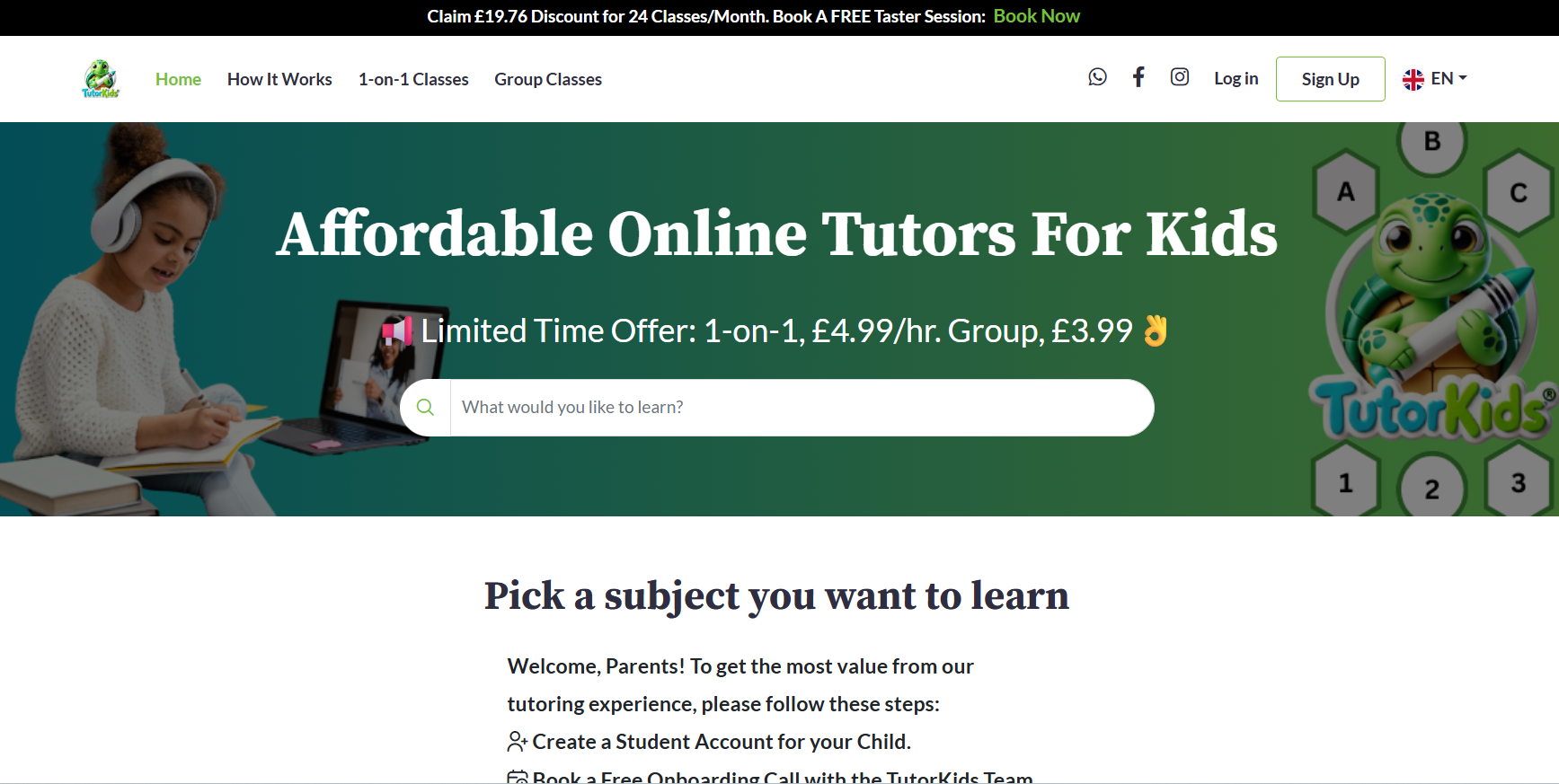
TutorKids is a UK-based K-12 learning marketplace offering one-to-one and group lessons on language, coding, science, robotics, and more. Students can book a lesson as per tutor availability and their own convenience. Besides academic support, the platform also helps with test preparation, special education needs, and skill-based learning.
How did Pinlearn help?: Built a modern e-learning platform with cutting-edge features such as video conferencing, dashboards, advanced course search, and secure payment integrations.
Do’s and Don’ts While Building an E-Learning Platform
Below are the key practices to follow while developing an e-learning platform:
| Do’s | Don’ts |
| Build a scalable infrastructure with cloud hosting services, modular architecture and auto-scaling systems. | Consider security and compliance as an afterthought. |
| Prioritize UX to curate a seamless user journey. | Ignore web accessibility features impacting platform usability. |
| Buy pre-built e-learning clone scripts to set a strong foundation and speed up development cycles. | Neglect ongoing costs like hosting, video streaming, maintenance updates. |
| Adopt mobile-first and responsive layouts. | Avoid analytics like course completion, user progress, scores, etc. |
| Validate and collect feedback from real users early. | Choose an innovative UI over familiar interaction patterns. |
| Use AI assistance for quiz, content structuring, etc., reduce friction. | Focusing on power features first in the initial platform version. |
Conclusion
This blog demonstrates how to build an e-learning platform without technical expertise or an extensive budget. All you need is an effective implementation plan and the right solution that helps to scale with speed and convenience.
Whether you’re building a course marketplace or a corporate training platform, Pinlearn helps you build a professional learning platform without writing a single line of code. The platform gives you complete ownership, 100% revenue with a one-time upfront investment.
Ready to build your e-learning platform? Follow this guide, come up with a solid business idea, and launch your platform with Pinlearn!
FAQs-Related to How to Create an E-learning Platform
1. What is an e-learning platform?
An e-learning platform is an online solution where learners can take up courses, live sessions, webinars, workshops, and track their progress. It helps to learn and enhance skills from anywhere and anytime.
2. How to create an online learning platform?
The steps for developing an online learning platform are ideation, audience research, competitor analysis, determining business model, understanding legal side, UI/UX planning, building technical infrastructure, content, launch and marketing your website.
3. What are the top 5 e-learning platforms?
Udemy, Coursera, edX, Skillshare, and LinkedIn Learning are the top 5 e-learning platforms.
4. How much do e-learning platforms usually cost?
The cost of building an e-learning platform is approximately $40,000 to $1,50,000+, depending on the complexity and platform type. E-learning softwares like Pinlearn reduces the cost significantly to $700 to $1500 for MVP platforms.
5. What is the actual difference between an LMS and e-learning platform?
An e-learning platform is a broad term and includes course marketplaces, tutoring sites, LMS, etc. While an LMS is a specific type of e-learning platform used to create, track, and manage learning content and student progress.
6. What are the different types of e-learning platforms?
Course marketplaces, tutoring websites, language learning platforms, LMS, technology upskilling platforms, and social learning platforms are its main types.
7. Is using ready-made e-learning software better than building from scratch?
Ready-made e-learning softwares like Pinlearn come with pre-built features like course management, video conferencing, appointment scheduler, payment gateway integrations, and dashboards. This helps businesses to launch their platform within 5-6 days at a lower cost. Building from scratch is expensive and takes 4-12 months to complete.