
How to Build a Website Like Unacademy: Complete Development Guide
TL;DR
- Unacademy is a leading educational platform offering structured courses, live classes, and interactive tests for exam and skill development.
- Building a learning platform like Unacademy starts with defining your platform idea and audience, creating a business plan, choosing the right development approach, content planning, final launch and promotional strategies.
- The core feature set includes video streaming, course management, progress tracking, interactive quizzes, payment integration, and admin panel.
- Two development approaches include ready-made marketplace clone scripts and building from scratch. Custom-built e-learning platforms cost $30,000 to $150,000+ approximately, while white-label solutions lower the cost to $700 to $1500 (based on customization) for MVP development.
- Pinlearn provides end-to-end development support for launching your Unacademy-style platform with pre-built clone scripts, offering an early market entry.
The online learning industry is a $417.1 billion growing market powered by edtech giants like Udemy, Coursera and edX. A deeper analysis reveals that every leading platform attained success by solving an existing market problem. And Unacademy is one among them!
Over the last decade, the platform has built a powerful learning hub for students appearing for competitive exams and tests in India. It partnered with top educators of the country for curating courses and lectures accessible from anywhere. Unacademy even entered the unicorn club, reaching a valuation of $3.44 billion in 2021.
If you want to know more on how to build a website like Unacademy, this blog could be your ultimate guide. Here we break down the key development steps, must-have features, and cost to ease your entrepreneurial journey.
What is Unacademy? Platform Workflow & Business Model
Unacademy is one of India’s top online learning platforms offering self-paced courses, interactive assessments, and live tutoring, with a strong focus on competitive exams. Its core offerings include study programs and preparatory materials for UPSC, IIT JEE, NEET, Bank exams, SSC JE, CAT and other entrance exams.
Unacademy’s free plan offers limited access to resources, free or live classes. But, Unacademy Plus (the most popular plan) includes interactive live classes, structured courses, live tests and quizzes.
Key Benefits of Unacademy:
- Expert & vetted educator network
- Live classes with subject experts
- Courses, learning resources, and interactive quizzes
- Multi-device access
- Built-in performance dashboard & analytics
- Subscription-Based plans
- Doubt-clearing sessions
Platform Flow & Business Model:
Unacademy works like a two-sided learning marketplace, connecting students with expert educators through courses and live sessions. Learners get access to live classes, mock tests and other study materials for various competitive exams and tests.
The learning platform operates on a freemium model, offering a large library of free content, while monetizing from paid subscription plans like Unacademy Plus. Users can unlock access to live classes, structured courses, practice tests, 1: 1 mentorship through the paid subscriptions.
So, subscriptions are the primary revenue source. Thus, in order to access live mentorship or comprehensive doubt solving sessions learners have to purchase the paid plan.
Educators are paid based on the number of views and engagement. Additionally, the platform also earns from B2B institutional partnerships and its YouTube channel.

Key Features for Building a Website Like Unacademy
Let’s look at the must-have features for learners, educators, and admin!
Learner Features:
- Account Creation & Registration: Create a simple login process where the platform gathers information based on learning goals. Allow users to create profiles, personalize their dashboards and track progress at a glance.
- Course Search & Discovery: Include a smart search and filtering option that enables learners to search for videos and tests by pricing, lesson duration, proficiency level, etc. Personalized recommendations make it easier for learners to find resources that match their learning goals and preferences.
- Live Classes & Doubt-Solving: A virtual classroom environment helps students to interact with educators, participate in polls and get their doubts cleared.
- Interactive Quizzes & Community Forums: Beyond live classes, offer practice tests, assessments, and downloadable lecture notes for competitive exams and academic purposes. Students can share ideas, get instant feedback and collaborate across peer groups and forums.
- Progress Tracking and Gamification: Engagement motivates students to achieve learning goals. Visual progress indicators, points, leaderboards, badges or streaks makes learning fun and more of a game-like experience.
Educator Features:
- Course Creation & Management Tools: Provide an intuitive course management interface for uploading videos, PDFs, and mock tests.
- Communication Tools: Chats, feedback tools, and real-time notifications facilitate effective communication between sessions.
- Analytics: Educators can track learner progress, attendance, scores and engagement and work to improve their teaching strategies.
- Payouts & Revenue Dashboard: Offer a comprehensive dashboard with insights on earnings, payout schedules, course sign-ups and conversion rates.
Admin Features:
- User Management: Admin can create, manage learner and educator profiles, along with streamlining onboarding and verification workflows.
- Content Moderation: Establish an effective content review process to ensure learners get access to high-quality resources catering to their topic and subject expertise.
- Subscription & Monetization: Diversify revenue with subscription plans, individual course purchase, bundles or packages.
- Revenue & Analytics Dashboard: A comprehensive admin panel offers business insights on revenue, segment-wise earnings, and overall business performance.
- Multi-Language Support: Enable UI localization (translate buttons, menus), Right-To-Left Language (RTL) support and translation support to deliver learning experience across diverse learnerbase. AI-powered translations help to dynamically translate interfaces or course content into multiple languages.
How to Build a Website Like Unacademy in 8 Steps?
Let’s walk you through the step-by-step guide for creating a website like Unacademy!
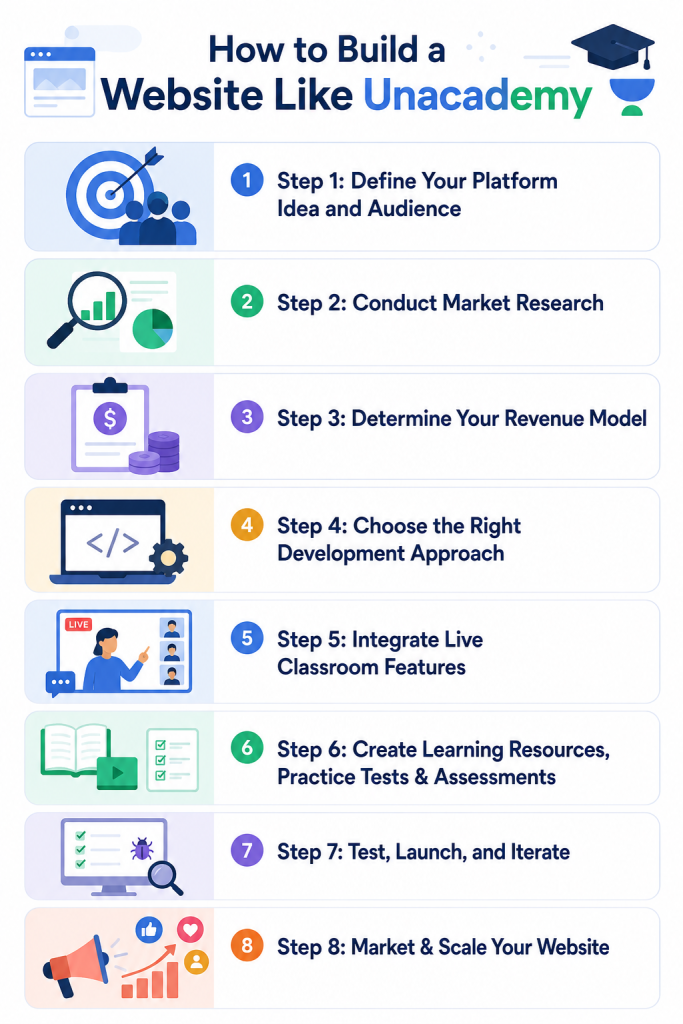
Step 1: Define Your Platform Idea and Audience
Start by defining your platform’s unique purpose or business proposition. This is what differentiates your platform and positions you better in the industry!
The simplest way is to scale on a relevant market problem that your audience is dealing with. And ensure your platform’s educational offerings address the problem. For example, structured learning paths, affordable pricing plans, practical and skill-based curriculum.
Understand your audience thoroughly, so that your platform’s features, design and overall experience align with their expectations.
Step 2: Conduct Market Research
Once you have your business idea, research the top competitors and prevalent market trends.
Look at their subject offerings, platform gaps, and even interactive features. Evaluate their pricing models and customer reviews across different platforms. This validates if there is enough demand and provides the right direction for your business.
Incorporate AI personalization, microlearning modules, mobile-first design to create a future-ready e-learning platform.
Step 3: Determine Your Revenue Model
Once you are done with the platform concept and initial market research, it’s time to choose a profitable revenue model. This ensures long-term sustainability and business growth of your platform.
Here are the common revenue models in the e-learning industry:
- Subscription: Earn recurring revenue by offering monthly or annual access to the vast content library. Provide high-quality and updated content to keep learners engaged.
- Per-Course Purchase: Individual course programs and specialized learning resources provide additional revenue beyond subscriptions.
- Freemium: Here users get free access to limited learning resources while upgrading to the paid plan ensures access to full course range and premium features
- Certification Fees: Earn additional revenue from paid certification for career advancements and skill learning.
- Corporate Partnerships: Strategic B2B offerings include training programs, enterprise-level features, and bulk access for large organizations.
Step 4: Choose the Right Development Approach
Once you have validated your platform demand and set up a business model; it’s time to bring your vision to life. The right development approach is one that aligns with your platform goals, budget, long-term scalability and risk tolerance.
The two primary development options are: custom development (building from scratch) and ready-made marketplace clone scripts like Pinlearn.
Custom Development
Building the entire learning platform from scratch requires hiring developers, testers and UX designers. The development timeline for Unacademy-like platforms typically runs 3 to 12 months, along with potential project delays.
The flexibility you get is tailored platform flows and complete control over every line of code and design, without being tied to any platform infrastructure. But the trade-offs are an extensive budget and the need for post-launch maintenance and security patches.
Unacademy Clone Scripts: The Smarter Approach
Unacademy Clone are pre-built software for launching e-learning marketplaces. They come pre-loaded with all core features, including video conferencing, course management, payment processing, and analytics. It offers a proven business model, already pre-tested for real-world scenarios and extending brand and niche-specific customization.
For a more detailed comparison, here’s a practical guide on Build vs Buy an E-learning Platform.
Step 5: Integrate Live Classroom Features
Real-time learning enhances learner participation, engagement and boosts the completion rates. While pre-recorded video lessons provide a comprehensive coverage of the topic, live chats, breakout rooms and collaboration keep the energy levels high.
Educators have the opportunity for direct student communication, interactive teaching tools and collaborative classroom activities.
Here’s how virtual classrooms keep learners engaged:
- Live video streaming
- Real-time chat
- Screen sharing & interactive whiteboard tools
- Instant polls and quizzes
- Breakout rooms
- Session recording
Integrate with livestreaming technologies like Agora, Zoom SDK and Twilio. This allows learners to access high-quality and low-latency sessions.
Step 6: Create Learning Resources, Practice Tests & Assessments
High-quality content builds a strong domain authority and attracts different kinds of learners. Unacademy is known for its comprehensive topic-wise programs, practice tests and assessments.
Similarly, you can partner with qualified subject experts and curate learning resources catering to different learning styles and proficiency levels.
Organize the content based on subject, topic, learning goals and difficulty level. Support videos, PDFs, slides, interactive quizzes and mock tests along with instant feedback. Incorporate gamification elements such as badges, leaderboards, points, streaks, etc.
Step 7: Test, Launch, and Iterate
Before launching your platform, thoroughly test all the features and functionalities. This includes the video streaming quality, course workflows, payment integrations, interactive quizzes and community experiences. Fix all the bugs, errors, and security vulnerabilities before the final launch.
Preferably, launch your platform among a small group of users and educators and gather feedback. Refine your features, UX and overall learning experience. Iterate the process, prioritize user updates and adapt your platform to real-world scenarios.
Step 8: Market & Scale Your Website
Now that your platform is live, it’s time you expand its reach and visibility. An effective marketing campaign begins with knowing your target audience. Focus on your audience’s demographics, pain points and key motivations. This helps you to tailor your marketing message and promotional tactics that win over your audience.
Here’s where your marketing spend must actually go:
- Creating educational blogs, leadership articles, and case studies
- Building your brand’s presence on Facebook, Instagram and LinkedIn with quick study tips, live Q&A sessions, and success stories
- Paid campaigns on Google Ads and social media for targeted reach
- Collaborations with niche influencers, subject matter experts, and career coaches
- YouTube tutorials explaining concepts, free webinars, and live classes
- Referral programs rewarding existing learners and educators for providing new sign ups
- B2B partnerships with educational institutions, organizations and non-profits
As your platform expands, scale with new course categories, multi-language support, additional revenue streams and AI-powered workflows. Develop a strong learning community and strengthen user retention strategies.
Tech Stack for Unacademy Clone Development
Choosing the right technology stack ensures your e-learning platform delivers high performance, scalability, and a secure learning experience. Modern tools & technologies make it easier to adapt to software updates and maintain your learning platform.
Below is the recommended e-learning tech stack:
1. Front-End Technology & Mobile Frameworks
The front-end ensures a smooth, responsive design and seamless UX for real-time learner interactions. Next.js and Vue.js technologies help to build fast, dynamic front-end interfaces. Choose cross-platform frameworks like React and Flutter for launching on both iOS and Android platforms.
2. Back-end Technology
Here’s where the actual business and API logic reside. A powerful backend manages everything from live-streaming, real-time transactions, user profiles and learning data efficiently.
Python/Django, Node.js, or Ruby on Rails are popular technologies for optimized and scalable backends. Databases like PostgreSQL and MongoDB enable fast and secure access to user and course data.
3. Video Streaming Infrastructure
Building a robust and scalable infrastructure is one of the core components of the tech stack. This includes video streaming APIs such as Agora, Zoom and WebRTC technologies. Also, popular video storage and CDN systems like AWS, Cloudflare Stream provide adaptive streaming and video transcoding capabilities.
4. Subscription & Payments
Stripe & PayPal are trusted payment providers for accepting one-time and recurring payments. Also, automate instructor payouts through Stripe Connect or PayPal.
What is the Cost to Build a Website Like Unacademy?
The cost to develop a website like Unacademy is approximately $30,000 to $150,000+. The actual cost is influenced by feature complexity, technology stack, AI integrations, video infrastructure requirements and customizations.
Cost Breakdown Based on Platform Scope
1. Basic MVP
Includes user profiles, course catalog & management, video streaming, progress tracking, interactive quizzes and secure payment gateway.
Cost: $30,000 – $50,000
2. Medium-Level Platform
Includes live classes, structured learning paths, gamification, personalized dashboards, analytics and mobile-responsive design.
Cost: $50,000 – $80,000
3. Advanced Platform
Includes advanced features such as AI recommendations, multi-language support, enterprise-level support, and community features.
Cost : $80,000 – $150,000+
Cost Breakdown Based on Development Approach
| Development Approach | Estimated Cost | Launch Time | Best For |
| Custom Development | $30,000 – $150,000+ | 3 – 12 months | Businesses with unique requirements or proprietary features |
| White-Label E-Learning Software | $700 to $1500 (MVP Platform) | 1 – 2 weeks | Entrepreneurs and startups looking for smart, cost-effective and customizable solutions with a powerful core. |
Conclusion
Building a powerful Unacademy-style platform requires a clear strategy, implementation plan, right resources, and extensive development efforts. However, modern solutions like ready-made e-learning software flip the script, by offering a convenient and affordable way to launch your e-learning platform.
A market-ready software like Pinlearn provides the core functionality, customization and branding support, so founders can focus on user acquisition and business growth.
FAQ-Related to How to Build a Website Like Unacademy
1. How long does it take to build a website like Unacademy?
An MVP learning platform takes 3-4 months to build, while a full-fledged platform with advanced features like real-time analytics, multi-language support, and gamification extends over 6-9 months. Ready-made Unacademy clone app reduces the time to launch an MVP to 1 to 2 weeks.
2. How much does it cost to develop a Unacademy-like website?
The cost of building a basic learning platform ranges from $30,000 to $50,000, while a complex platform costs $80,000 to $150,000+. Pre-built solutions with essential features cut down the development cost to $700 to $1500 for MVP platforms.
3. Can Pinlearn help me create a website like Unacademy?
Yes, Pinlearn is a ready-made e-learning software with pre-built features such as live video conferencing, course management, interactive tests, payments and dashboards. You get a launch-ready platform without any coding skills with which businesses can monetize from day one!
4. How can I attract educators to my learning platform?
Offer competitive revenue, powerful features and tools, marketing support, analytics and reporting features to attract an initial set of educators.
5. What are the technical challenges for building a Unacademy-like platform?
Managing video hosting infrastructure, low-latency live streaming, integrating security features, and user privacy demands expertise and third-party integrations.