
How to Build a Website Like Khan Academy: Step-by-Step Guide
TL;DR
- Key features to build a Khan Academy-style platform include video lessons, course management interface, payment integration, interactive quizzes and assessments, progress tracking, gamification and mobile responsiveness.
- The Khan Academy clone development process includes niche selection, market analysis, UI/UX design, planning the business model, choosing the development approach, curating a structured learning path, launching and marketing your site.
- The traditional custom development approach takes $30,000 to $150,000+ approximately, depending on feature complexity, tech stack and customization.
- For founders, ready-made e-learning software helps to launch within a $700 to $1499 budget, validate and consider user feedback as you scale your platform.
Khan Academy has inspired the learning industry with its amazing success and uniquely mission-driven path. Its larger-than-life vision of “free world-class education for anyone, anywhere” is a north-star leading businesses to look beyond mere profits.
The platform features a large library of instructional videos, interactive tests and tools for academic subjects and professional skills. If you’re an entrepreneur on a similar path, here’s our comprehensive guide on “how to build a website like khan academy.” We cover the must-have features, key steps, costs and smart development approaches to help you get started!
Why Build a Website Like Khan Academy?
Before we move on to the “how to build“ section, let’s understand the key reasons to build a website like Khan Academy.
- Make Quality Education Accessible: By building a non-profit like Khan Academy, learners around the globe can access quality education despite the geographical barriers.
- Massive Demand: E-learning is a $417.1 billion industry in 2026 fueled by personalized learning, integration of AI and technology advancements.
- Build Brand Authority: When you provide quality educational resources and learning assistance for various subjects and skills, your brand builds a solid reputation in the industry. This attracts a large number of learners, educators and investors to your platform.
- Global Scalability: Expand your e-learning platform to diverse audiences across countries and time zones, explore strategic partnerships and niche learning opportunities to scale effectively.
Key Features to Build a Website Like Khan Academy
If you’re serious about building a website like Khan Academy, a powerful, feature-rich interface is your road to success. Start with core features first, then move on to building to the advanced functionalities.
Here are the must-have features for students, parents and teachers:
- Course Search & Discovery: Allow students to search across the content library for videos, resources and tests.
- Course Management: Offer an easy course interface to upload video lessons, interactive quizzes, tests and preparatory materials. Offer structured modules and categorization by subject and grade level.
- Video Lessons & Hosting: Users can navigate through video lessons with high-quality video streaming, playback options, subtitles, and resume options.
- Interactive Tests and Assessments: Incorporate quizzes, assessments, instant feedback and interesting challenges for a well-rounded learning experience.
- Secure Payments: Provide Stripe or other payment integrations for donations (for non-profit platforms), premium upgrades, or district partnerships.
- Progress Tracking: Show course progress, scores and time spent within the student dashboards. This keeps students motivated and parents informed on the potential areas of improvement.
- Gamification: Streaks, challenges, badges and points motivate students to meet their learning goals.
- AI Features & Personalization: Students can seek AI assistance for personalized recommendations, homework help, or doubt solving. Teachers can use tools for lesson planning, drafting emails, or speeding up day-to-day tasks.
- Push Notifications: Gentle nudges for completing lessons, challenges, and streaks inspire learners to complete their goals.
- Communication Tools: Forums, study groups, and direct teacher interactions help with sharing ideas, concepts and clearing doubts.
- Mobile-Responsiveness: Optimize with clean navigation, responsive layouts for seamless access from mobile, desktops and tablets.
Step-by-Step Process to Build a Website Like Khan Academy
Building a website like Khan Academy that offers personalized, engaging and world-class learning experiences needs business planning and strategy.
Here’s a breakdown of the key steps for creating a website like Khan Academy:
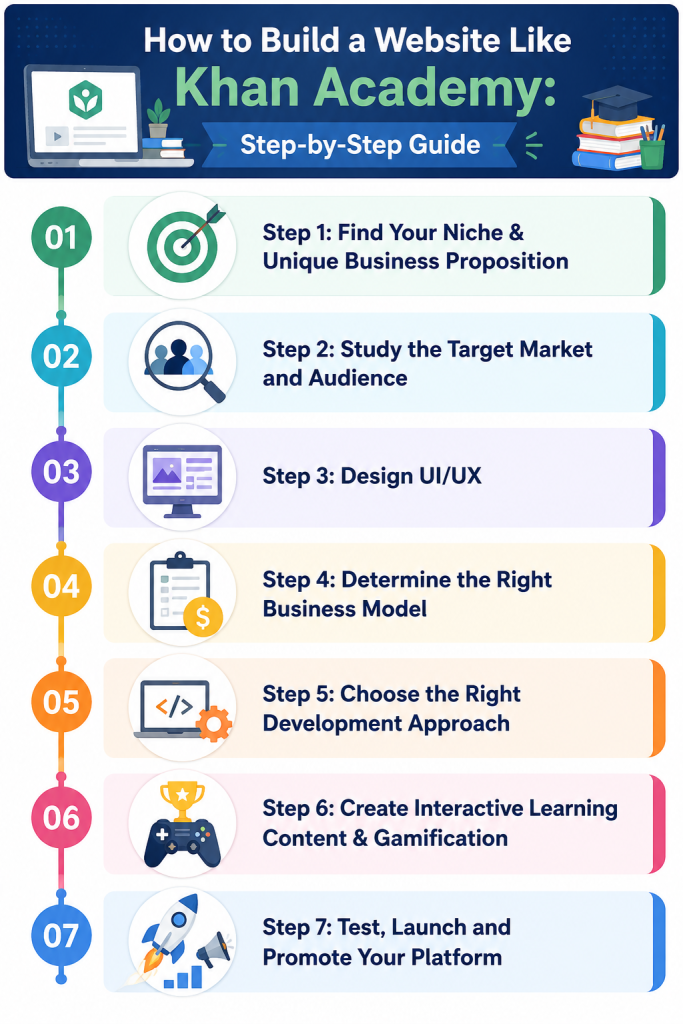
Step 1: Find Your Niche & Unique Selling Proposition
A tailored niche and powerful USP are what make your platform stand out from generic e-learning websites.
Key questions to ask for niche planning:
- Who is your target audience? (K-12 learners, professionals, college students)
- Which subjects or services does your platform cater to? (STEM, test preparation, skill-specific training, certifications)
- Whether you offer self-paced learning, live tutoring, or hybrid learning?
- What are the learner’s needs, motivations and problems? (Project-based learning, bite-sized modules, Learn within 6 weeks)
Khan Academy offers quality learning resources to K-12 learners for academic support and test preparation. It started with a mission of free, quality education to anyone, anywhere. Structured learning paths, mastery-based learning, and interactive practice tests are its unique strengths.
Step 2: Study the Target Market and Audience
Next, it’s time to research your audience, target market and competitors. Create a persona based on their demographics, education, preferences, behavior, etc. This helps to design a platform tailored to their expectations and needs.
Analyze leading e-learning platforms such as Khan Academy, CK-12, Quizlet, IXL Learning or OpenStax. Compare their strengths, weaknesses, platform gaps and turn them into growth opportunities. For instance, evaluate their learning services, pricing, business model, and course delivery infrastructure.
Step 3: Design UI/UX
An effective UI/UX balances engagement with functionality. Incorporate clean layout, easy navigation, side panels and structured content paths for better accessibility. A minimalist, learner-centric website like Khan Academy’s creates a distraction-free environment.
Offer personalized dashboards with course progress, recommendations, and viewed content. Provide a mobile-friendly design for a seamless learning experience from desktops, smartphones and tablets.
Step 4: Determine the Right Business Model
Choosing the right e-learning business model balances revenue flow and platform profitability! This ensures the sustainability and growth of the e-learning platform.
Non-profits like Khan Academy offer free, quality education and monetize via donations and grants. It primarily receives grants from philanthropic organizations (like Bill and Melinda Gates, Chan Zuckerberg initiative), individual contributors, and subject matter experts. Additional revenue sources include test preparation courses, district programs and a YouTube channel.
The traditional monetization strategies include:
- Freemium model: Offer free access to the basic lessons, while charging for full course access, practice tests, certifications or offline features.
- Subscription Tiers: Monetize from recurring subscription plans with video lessons, personalized learning paths and bundles. Higher tiers include live tutoring, priority support and more.
- In-App Ads: Earn additional revenue by advertising related brands and businesses within your e-learning platform.
- B2B Partnerships: Collaborate with schools and educational institutes and design a learning curriculum or dedicated course modules.
Step 5: Choose the Right Development Approach
One of the biggest development decisions entrepreneurs face is: whether to choose custom development or ready-made solutions? While there is no right or wrong choice, it certainly decides your platform’s scalability, time-to-market, and budget.
Building an e-learning platform from scratch means you integrate new features, tailor the user experience and proprietary configurations based on your business requirements. This approach offers flexibility, but is time-consuming and expensive.
Ready-made e-learning software is prebuilt, highly customizable and replicates the essential features of the original marketplace. The advantages are obvious: faster launch, lower upfront cost and low technical risk. On top of that, you own the license, can customize and brand the software.
Here we compare both the development approaches:
| Comparison Factor | Custom Development | Ready-made E-learning Software |
| Time to Launch | 4 to 12 months | 5 to 6 days |
| Development Cost | $40,000 to $150,000+ | $700 to $1500 (MVP platform) |
| Maintenance | High costs & complex cycles | Low maintenance cycles included in support |
| Customization | High | High |
| Risk Level | High | Low (Proven Model) |
Step 6: Create Interactive Learning Content & Gamification
Even the best features and design might fall short if your content isn’t up to the mark! Offer an immersive learning experience with interactive quizzes, videos, practice tests and other collaborative tools.
Organize your content into structured learning paths. For example, course-> units/modules -> lessons-> exercises -> assessments. This offers a comprehensive understanding of the topic as well as makes the learning less overwhelming.
Step 7: Test, Launch and Promote Your Platform
Before the final launch, test all the functionalities, fix critical bugs, and optimize for high performance. Conduct usability and functional tests across all platforms, check for security vulnerabilities and protect user privacy.
Once your platform is ready, deploy it to a reliable server and domain, and configure third-party integrations. Monitor your platform for traffic, engagement, page load speed, conversions and more.
Effective promotional strategies include:
- Content marketing and SEO
- Social Media Marketing & Influencer Marketing
- YouTube Marketing
- Referral Programs
- Paid Ads for targeted reach
- Partnerships with educational institutions, educational organizations and non-profits
Related: How to promote an e-learning platform
Cost of Building a Website Like Khan Academy
The cost to develop a website like Khan Academy is approximately $30,000 to $150,000+. The actual cost may vary based on several factors, but we have provided a rough estimate.
Cost Breakdown Based on Platform Complexity
1. Basic MVP
Includes user accounts, course management, video lessons, progress tracking, interactive quizzes and practice tests
Cost: $30,000 – $50,000
2. Medium-Level Platform
Includes personalized learning paths, gamification, dashboards, analytics and mobile responsive design
Cost: $50,000 – $80,000
3. Advanced Platform
Includes advanced features such as AI tutoring, Adaptive learning, multi-language support, and enterprise-level features
Cost : $80,000 – $150,000+
Cost Breakdown Based on Development Approach
| Development Approach | Estimated Cost | Launch Time | Best For |
| Custom Development | $30,000 – $150,000+ | 4-12 months | Businesses with unique requirements |
| White-Label E-Learning Software | $700 to $1500 (MVP Platform) | 1-2 weeks | Entrepreneurs and Startups launching early within limited budget |
Factors Impacting the Development Costs
The final development costs are influenced by the several factors including:
Feature Complexity
Complex features like gamification, adaptive learning paths and enterprise-level features take more time to develop. This increases development costs compared to a simple e-learning website.
Developer Rate & Team Location
Developer rates vary by country and region. For example, the development cost is significantly higher in North America and Western Europe as compared to Asia and Eastern Europe.
Platform Choice
Custom development requires an extensive budget as you’re building the entire infrastructure from scratch. Using pre-built frameworks reduces the development cost and provides ready-to-launch software with essential features already in place.
Design Complexity
While an interactive UX engages the users, you need skilled designers and developers in your team to design one. Gamification elements, animations and custom designs further increase the cost.
Customization & Third-Party Integrations
If you’re planning for long-term growth, niche-specific customizations and third-party tools are important. This often needs UX tweaks and workflow customizations adding to the costs.
How to Build a Website Like Khan Academy with Pinlearn?
At Pinlearn, we value innovation and help businesses launch transformational edtech platforms built at scale. From tutoring marketplaces to niche learning platforms, our team is skilled to develop all kinds of e-learning platforms. Our talented team of experts help entrepreneurs move their idea from plan to launch and scale with confidence.
Here’s the plan-to-launch roadmap we follow:
1. Purchase Your Pinlearn License
Entrepreneurs can choose from Starters($699) or Professional ($1499) plans to launch their e-learning platform. Both plans provide standard features, white-label branding and a lifetime license, but the professional plan offers full source code access.
2. Choose Your Monetization Model & Customizations
Pick a business model that drives money to your platform. Select from pay-per-course, subscriptions, ads, or a freemium model based on your platform goals. Plan the essential UX and workflow customizations on the base software.
3. Setup and Installation
Once you have acquired the license, the support team guides you through the initial setup and installation, deploying your platform on your preferred server environment.
4. Configuring Marketplace Features
The next step is to configure payment gateways, monetization settings, branding, video conferencing API, analytics, commission and other platform settings. This ensures the software aligns with your business requirements.
5. Launch and Scale Your Platform
Finally, launch your platform and make it publicly accessible for your target audience. Over time, you can scale your platform with Pinlearn’s premium add-ons providing revenue diversification, regional payment providers, security features and visual enhancements.
Are You Ready to Launch a Platform Like Khan Academy?
Khan Academy’s success proves that a simple mission to democratise education can transform into a revolutionary educational business. In this blog, we have covered all the essential strategies and steps to develop a platform like Khan Academy.
If you’re looking for a smart path to launch a website like Khan Academy without building every feature from scratch, then start with a performance-ready foundation that helps you validate early and scale your business. Contact our team today and be the next edtech business to transform the e-learning landscape!
Further Reading:
- How to create a website like Udemy
- How to create a website like Coursera in 8 Steps
- How to build a website like edX
FAQ-Related to How to Build a Website Like Khan Academy
1. How long does it take to build a website like Khan Academy?
Building all the features from scratch takes 4 to 12 months, depending on the feature complexity. White-label clone scripts cut costs to $700-$ 1,500 for MVP platforms.
2. Can I create a website like Khan Academy without coding?
Yes, white-label e-learning software like Pinlearn helps you launch your platform without coding. It offers a pre-built framework with course management features, messaging, payment integration, a dashboard and analytics.
3. Is ready-made tutoring software scalable?
Yes, ready-made tutoring software is built on a scalable tech stack and can accommodate the growing user base, peak traffic loads and connect with leading third-party APIs.
4. What are the technologies required for building a website like Khan Academy?
Use React or Next.js for the Frontend, Node.js or Django/Python for the backend, and PostgreSQL or MongoDB for the database. AWS and Google Cloud are cloud storage services.