
How to Launch an Online Coaching Website Under $1500
TL;DR
- Custom-built coaching websites are expensive due to developer costs, extended timelines and impending technical failures.
- Pre-built coaching software lowers development cost, speeds up launch, is pre-tested, and ready to deploy.
- Must-have features for coaching websites include live video integration, search & discovery, secure payments, communication tools, dashboards and analytics.
- Coaching platforms can expand revenue with commissions, private and group sessions, subscriptions, courses and package bundles.
- The development cost for pre-built coaching software starts from $699 and it can be launched within 1 week. Custom development budget ranges from $25,000 to $80,000 and spans across months.
Over the years, coaching has evolved beyond sports into corporate and personal life coaching. Today, performance coaching, the GROW model, and goal setting are widely used to unlock an individual’s true potential. The future of the coaching industry is robust, fueled by diverse niches, the need for upskilling, and AI integration.
If you are passionate about coaching or want to turn your expertise into a growing coaching business, now is the right moment to step in! Entrepreneurship could be a bittersweet journey, so we are here to help you! In this comprehensive guide, we explain how to create an online coaching website, why traditional development isn’t always a smart choice, cost analysis, smart alternatives and key practices to get your entrepreneurial sprint right the first time!
Why is Custom Development Expensive? Why Pre-Built Coaching Software is a Smarter Alternative?
Building a coaching website from scratch requires an upfront cost for discovery & planning, UX design, feature development, testing & launch. This involves a significant amount of time and drains resources. Besides, there is always the risk of technical failures, project delays and technical debt.
A pre-built coaching software is a smarter alternative, given its battle-tested features and lower financial overheads.
Benefits of Choosing Pre-Built Coaching Software:
- Faster Time-to-Market: Custom development cycles are longer and unpredictable. Validate your idea, gather user feedback and edge ahead with pre-built software.
- Lower Development Cost: Hiring a development team means substantial costs based on your team size, location and timeline. With ready-made coaching software, you can cut down project costs and focus on business growth.
- Customization & Scalability: Pre-built softwares offer full customization support, scalable architecture and even extensive add-ons to grow your business.
- Branding & Platform Control: The full source code access and 100% white-labelling support allow businesses to set up unique branding and own their software.
- Multiple Revenue Channels: Commissions, 1:1 coaching sessions, cohorts and courses scales up the platform revenue significantly.
Related: Before you go through the step-by-step launch guide, look at the essential checklist to start a coaching business.
How to Create an Online Coaching Website: Step-by-Step Guide
Whether you’re planning to scale a life coaching or a fitness coaching platform, you need a clear strategy and planning to get started!
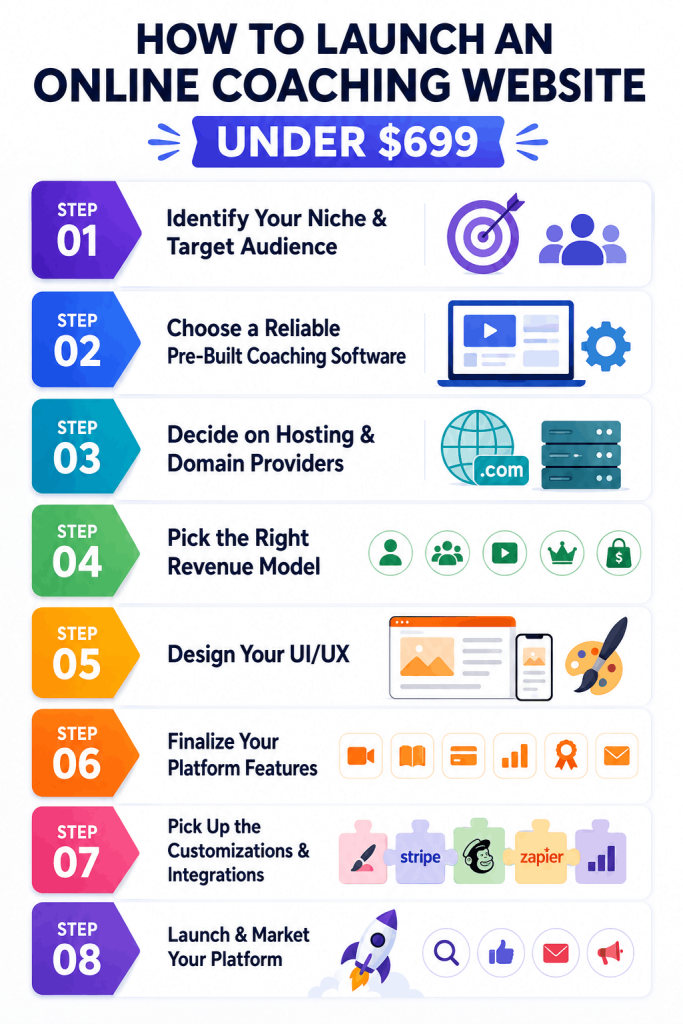
Step 1: Identify Your Niche & Target Audience
To begin your coaching journey, you need a solid niche and target audience. This helps you to establish a unique business proposition and brand credibility. Your niche should focus on a subject area you have experience in or are deeply passionate about.
Once you have your niche, narrow it down further to a specific demographic or relevant pain point.
Say you are running a fitness & wellness coaching business. You could launch your coaching services especially for women aged between 25 and 40 years, who need help meeting their fitness goals.
Popular coaching niches include:
- Life Coaching
- Business Coaching
- Fitness & Wellness Coaching
- Career Coaching
- Parent Coaching
- Financial Coaching
Defining a clear niche helps to refine your transformational outcome, marketing strategies and position your business better. Your target audience is looking for specific advice, so research and tailor your services to address their challenges.
Related: 🔍Want to know what’s trending in the industry? Here’s our guide on the profitable niches in the coaching industry.
Step 2: Choose a Reliable Pre-Built Coaching Software
Now that you have your niche and have decided upon a pre-built coaching software, it’s time to choose the right one. This is a fundamental decision and impacts your performance, scalability, and budget; so invest enough time in this step!
Here are the key factors to consider while choosing pre-built coaching software:
- Ease-of-use & responsive design
- Built-in feature set with live video integration, payment gateway, booking systems, dashboards, etc.
- Customization & branding features to scale competitively
- Niche compatibility to your desired niche
- Third-party integrations for video API, payment gateway, analytics and more
- Long-term maintenance & support
- Pricing & total cost of ownership
Pinlearn is a powerful choice for entrepreneurs and startups prioritizing affordability, scalability, and speed in the evolving coaching landscape. It offers a dedicated, white-label, and customizable coaching software to set up and grow your business. With technical complexities, operational overhead, and budget overruns sorted out, now you can focus on marketing and acquisition strategies.
Step 3: Decide on Hosting & Domain Providers
One of the fundamental steps to setting up your coaching website is choosing the right hosting provider and domain name. These two aspects are crucial for building a memorable coaching brand; make sure you do it right!
1. Domain
Your domain name is your website address, by which users access your platform. So, choose a name that matches your niche and is easy to remember. Make it short and relevant to your coaching brand. While getting a .com domain extension might be difficult, look for creative ones like .life, .io, .fit, or .academy, based on your niche.
Popular Domain Providers: GoDaddy, NameCheap, Hostinger
2. Hosting Server
Your hosting server is the place where all your website files are stored. It determines your platform’s performance, security and uptime, so choose a reliable hosting provider.
VPS hosting is recommended for growing coaching platforms for dedicated resources and complete control.
Recommended Hosting Setup:
- Popular hosting providers: – DigitalOcean / Linode / AWS EC2 / Hostinger
- Minimum Requirements: 2-core CPU, 4GB RAM, 80GB SDD is minimum
- OS: Ubuntu 22.04
Step 4: Pick the Right Revenue Model
The next step is to list out all the monetization streams for your coaching website. It impacts your platform’s profitability, user acquisition, retention strategies, and long-term sustainability.
Here are the most profitable revenue channels:
1. Commission-Based Revenue Model
This is the primary revenue channel for many coaching marketplaces. The platform takes a fixed commission percentage (e.g., 10% to 20%) on every coaching session or other transactions. This is best for platforms with multiple coaches or mentors offering personalized coaching to clients.
Why Does It Work?
Platform growth aligns with the coach’s success, predictable revenue growth, and a low entry barrier.
2. Pay-Per-Session Model
Clients pay for individual coaching sessions specific to their area of concern or needs. You can also bundle together coaching sessions and offer them at a discounted rate.
Why Does It Work?
Provides pricing flexibility and no need for long-term commitment
3. Group Coaching Programs
Cohort coaching programs, webinars and workshops are a scalable revenue model. Coaches can work with multiple students and earn more than 1:1 live sessions.
Why Does It Work?
Earn higher revenue per hour, enriches learning experience and offers affordable packages for clients
4. Subscription Pricing Plans
Charge clients or coaches a monthly or annual subscription fee for platform access. For example, learners can join premium membership plans, or coaches can avail high-tiered plans with platform access, client progress tracking and analytics.
Why Does It Work?
Monthly/Annual subscription plans keeps cash flow steady, offers high retention and enhances business growth
Other revenue models include coaching package bundles, featured listings, or advertising models.
Step 5: Design Your UI/UX
Your website design shapes the user’s coaching journey! Right from onboarding to the final outcome, be sure your website works seamlessly.
Add clean layouts and a smooth navigation structure. Few other best design practices include simple menus, intuitive platform flow, clear CTAs, and separate dashboards for admin and tutor. Also, create a dedicated client dashboard for tracking sessions, progress, completing intake forms and receiving feedback.
Don’t overwhelm the users with too many features; prioritize a mobile-responsive and professional design.
Step 6: Finalize Your Platform Features
The success of your coaching platform depends on building a powerful feature stack. It impacts the overall platform experience and user journey.
User Features
- Login & Registration: Build a seamless onboarding experience with a simple and intuitive login interface. Enable Google login or social sign-in to make the process more convenient.
- Coach Search & Discovery: Allow users to find the right coach with filtering options such as niche, price, location, language, and availability.
- Session Booking & Reminders: Users can book 1:1 or group coaching sessions based on the coach’s availability and their convenience.
- Secure Payments & Wallets: Integrate with Stripe and PayPal to manage one-time payments, subscriptions and commissions (automated payment splitting).
- Live Video Conferencing: Enable live coaching sessions where coaches can guide, interact and support learners. Zoom, Lessonspace and Google Meet are the top built-in video conferencing integrations.
- Communication Tools: Chats, email notifications, and feedback sharing systems improve coach-client communication.
- Rating & Review System: Enable users to rate their coaching experience after every completed session to build credibility.
- Mobile-Friendly Design: Optimize your coaching website for easy access from smartphones, tablets, and desktops.
Coach Features
- Session Scheduling & Availability: Offer robust scheduling tools for coaches to set availability, block slots and approve booking requests.
- Dashboard & Reporting: Provide a comprehensive analytics dashboard for client management, track progress and earnings.
- Interactive Coaching Tools: Real-time video conferencing, whiteboards, document sharing and chats make the coaching session highly engaging.
- Content Management: Enable coaches to effortlessly create, upload and publish courses or coaching materials.
- Lesson Pricing & Payouts: Coaches can decide lesson pricing, packages and bundles based on the session duration. Besides, they can initiate a payout request to the admin depending on the completed sessions.
Admin Features
- User & Coach Management: Centralized admin panel enables managing coach approvals, user accounts and sessions from a single dashboard.
- Content Moderation: Admin can review the uploaded PDFs, blogs, and guides as per platform guidelines.
- Commission & Revenue Analytics: Business analytics offers data-driven insights on platform revenue, commissions, and top-earning segments.
- Platform Settings & Branding: Set third-party tools for payment gateway, analytics, video conferencing, and also change logos and other brand settings.
Step 7: Pick Up the Customizations & Integrations
To stay competitive, tailor your platform to your target audience and niche. Think about video demonstrations, personalized workout plans, or user profiling for a fitness coaching platform.
Here’s a list of essential customizations:
- Client Onboarding & Dashboards: Curate your onboarding workflow depending on your niche or client goals. (e.g., personalized goal planning for fitness coaching).
- Branding & White-Labeling: Customize your software with your logos, colors and branding elements to reinforce trust and credibility.
- Payment Integration: Integrate with either popular payment gateways or regional gateways as per the target market or audience preferences.
- Video Conferencing Tools: Build a live virtual environment by connecting with Zoom, Lessonspace or Google Meet.
- Multi-Language and Multi-Currency Support: Scale your platform globally across an expansive user base and support localized currency as well as payment methods..
- Engagement: Personalize coaching experience with progress tracking, goal setting, habit tracking, and gamification.
- Community Features: Embed forums, accountability networks, and live Q&A for a better coaching experience.
Step 8: Launch & Market Your Platform
Now, your coaching website is good to go live! Before you launch your website, test all the workflows, gather user feedback, and monitor its speed.
Once you have launched your coaching website, it’s time to expand its reach. Your platform needs to attract coaching clients and coaches with its visibility and brand authority.
And that’s where most businesses fail: promoting to the wrong target audience.
So, first thoroughly research your audience before developing your marketing strategy. Target the channels that they frequently use and build high-converting marketing funnels.
Below are the best marketing strategies for your coaching website:
- Social Media Marketing: Build a strong brand presence on Facebook, LinkedIn, Instagram and X. Research platforms where your clients are most active. Share coaching tips, informational posts, live Q&A sessions, etc.
- Referrals: Create a referral program for coaches and clients, rewarding them for new signups. Incentivize them with discounts, commissions, or free coaching sessions.
- Paid Ads: Run paid ads on Google search ads, Facebook ads and LinkedIn ads targeting specific audiences.
- YouTube Marketing: Direct organic traffic to your website from educational YouTube videos. Plan branded content or coach-contributed videos.
- Content Marketing & SEO: Create blogs, how-to-guides, coaching checklists, templates or ebooks showing your industry expertise. Research relevant search terms like “online fitness coaching” or “business ” and include them in blogs, landing pages, or your social media business account.
- Email Marketing: Build an email list with potential prospects and share newsletters, promotional emails and platform features with them.
- Influencer & Affiliate Partnerships: Collaborate with popular niche influencers, bloggers, or podcasters to promote your website across their audience.
Detailed Cost Breakdown: Development Cost & Ongoing Cost Drivers
So, how much does it cost to build a coaching website?
The cost of developing a coaching website ranges from $25,000 to $80,000+ approximately. Feature complexity, integrations, customizations and UI/UX design impact the development cost.
Here’s a quick overview of cost based on platform complexity:
| Platform Complexity | Estimated Cost | Timeline |
| Basic Coaching Platform | $25,000 – $40,000 | 4-6 months |
| Medium-Level Platform | $40,000 – $60,000 | 6-8 months |
| Advanced Coaching Marketplace | $60,000 – $80,000 | 8-12 months |
Let’s pull in a cost comparison for the two basic development approaches:
| Development Approach | Estimated Cost | Timeline | Best For |
| Fully custom built coaching platform | $25,000 – $80,000 | 4-12+ months | Coaching businesses with unique requirements |
| Pre-Built Coaching Software by Pinlearn (Built-in payments, marketplace support, custom design, analytics) | Starts from 699 | Launch within 1 week | Entrepreneurs and startups seeking a quick launch under a tight budget |
Ongoing or Overlooked Costs:
1. Hosting Cost – Recurring monthly cost to run your coaching website on the server.
- Cost: $42 – $150 per month
2. Domain name – Annual expense to register your domain name.
- Cost: $10 – $20 per year
3. Video APIs (Zoom, LessonSpace, Twilio) – Follows a pay-as-you-go model, billed per participant per minute.
- Cost: $50 – $300 per month
4. Payment gateway fees – Depends on the payment provider, payment method, and transaction volume.
5. Maintenance & support – Includes technical support, bug fixes and software updates.
- Cost: $1000 – $3500 annually
Common Mistakes to Avoid While Launching Your Coaching Website
This is the first time you are launching your coaching website, and you’re bound to make some mistakes! But, with our experience of launching successful coaching websites, we list out the biggest mistakes our clients make; so you don’t repeat it!
1. Launching Without an Audience
Many of our clients launch their coaching website without researching the target audience. Instead, pre-launch a landing page, waitlist, or prototype and gather valuable insights on your audience. This lays the perfect groundwork to scale your platform better.
2. Weak Client-Coach Matching System
Browsing through 100 coach profiles is overwhelming (and definitely boring). A robust matching algorithm connects clients with the right coaches based on their niche, goals or pricing requirements.
3. Taking Low Commissions from Coaches
Low commission rates might sound like an attractive acquisition strategy, however, there are significant trade-offs. It attracts new coaches easily, but slows down revenue growth, reduces brand authority and even attracts the wrong audience.
4. Ignoring Mobile Experience
People judge your website within seconds! Slow page loads, frustrating form-filling experience, and lengthy onboarding eventually means lost sales. Business websites are typically built for desktops, and completely break down on smaller screens like mobiles and tablets.
Conclusion
To build a successful coaching platform, you need strategic planning, the right development approach and a rock-solid marketing strategy. Speed and budget are essential factors for the development process. You can’t ignore the significance of niche and audience analysis. So, tailor your platform to your niche and audience pain points.
Whether you’re scaling on fitness or business niche, Pinlearn knows exactly how to help you launch a successful coaching business. It is not just a powerful tool, but a strategic investment for your business, operations and client experience.
Connect with us to launch your coaching platform that’s all set to revolutionize the industry!
FAQ-Related to How to Create an Online Coaching Website
1. How to build an online coaching platform without any coding skills?
Yes, you can build a coaching website without any coding knowledge or technical expertise using pre-built coaching software. These clone scripts offer booking systems, live video conferencing, pre-built dashboards and payment gateways integrated into your all-in-one coaching platform. The provider offers free installation support guiding you through the initial setup and configuration, hence you don’t need any technical expertise.
2. How long does it take to build a coaching website?
Pre-built coaching software by Pinlearn helps you launch your coaching website within a few days. The exact development time depends on your customizations, integration and feature complexity. This is significantly faster than months of development needed for custom development.
3. How can coaches and admins monetize on Pinlearn-powered websites?
Coaching businesses can monetize from multiple revenue channels such as commissions, live sessions, courses, subscription plans, featured listing, etc.
4. Does Pinlearn support live video coaching?
Yes, Pinlearn supports live coaching sessions through Zoom and Lessonspace integration.
5. Is Pinlearn suitable for long-term coaching business growth?
Yes, Pinlearn is built on a modern and scalable tech stack that supports diverse revenue streams, built-in marketplace support, and multi-lingual and multi-currency support.