
How to Create a Website Like Udacity?
TL;DR
- Udacity is a career-focused online learning platform offering project-based Nanodegree programs for individuals and enterprise workforce training.
- To build a website like Udacity, choose a niche, define your business model, create high-quality learning programs, and implement essential platform features.
- You can launch using a ready-made LMS for faster deployment or choose custom development for greater flexibility and scalability.
- The cost to build a website like Udacity ranges from $1,499 for a ready-made LMS solution to $150,000–$300,000+ for a fully custom platform, depending on features and business requirements.
Udacity is known for its career-focused Nanodegree programs, project-based learning, and partnerships with leading technology companies. Unlike traditional online course platforms, it helps learners build practical, job-ready skills in fields such as AI, data science, cloud computing, and software development.
Today, Udacity serves 16.9 million+ registered users across 240+ countries, with 2.6 million+ project submissions and 205,000+ Nanodegree certificates awarded. It also reports that 73% of graduates experienced a positive career outcome, reflecting the growing demand for career-oriented online learning.
If you’re planning to create a website like Udacity, this guide covers the essential features, development approaches, business model, and the cost to build a website like Udacity.
What Is Udacity? How Does It Work?
Udacity is an online learning platform that offers Nanodegree programs focused on technology fields such as AI, data science, programming, cloud computing, and cybersecurity. Its programs are designed to help learners develop practical, job-ready skills through structured learning paths.
Unlike many online learning platforms, Udacity combines video-based lessons with coding exercises, real-world projects, mentor support, and career services to create a more career-oriented learning experience.
The platform primarily serves two user groups:
1. Individual Learners
Learners can enroll in self-paced Nanodegree programs, complete video lessons, coding exercises, quizzes, and real-world projects, receive feedback from project reviewers and mentors, and earn industry-recognized Nanodegree credentials. Many programs also include career services such as resume reviews, portfolio guidance, and interview preparation.
2. Enterprise Clients
Organizations use Udacity to upskill and reskill employees in areas such as AI, data science, cloud computing, cybersecurity, and software development. Following Accenture’s acquisition of Udacity, enterprise workforce training has become a major focus, with role-based learning paths designed to support business and digital transformation initiatives.
This structured learning approach, combined with industry-relevant projects and career support, is one of the key factors that differentiates Udacity from many other online learning platforms.
Why Build a Website Like Udacity?
The online learning industry is growing rapidly, creating new opportunities for entrepreneurs to enter the e-learning market. As technical skills become increasingly in-demand, building specialized education platforms can help learners master job-ready abilities.
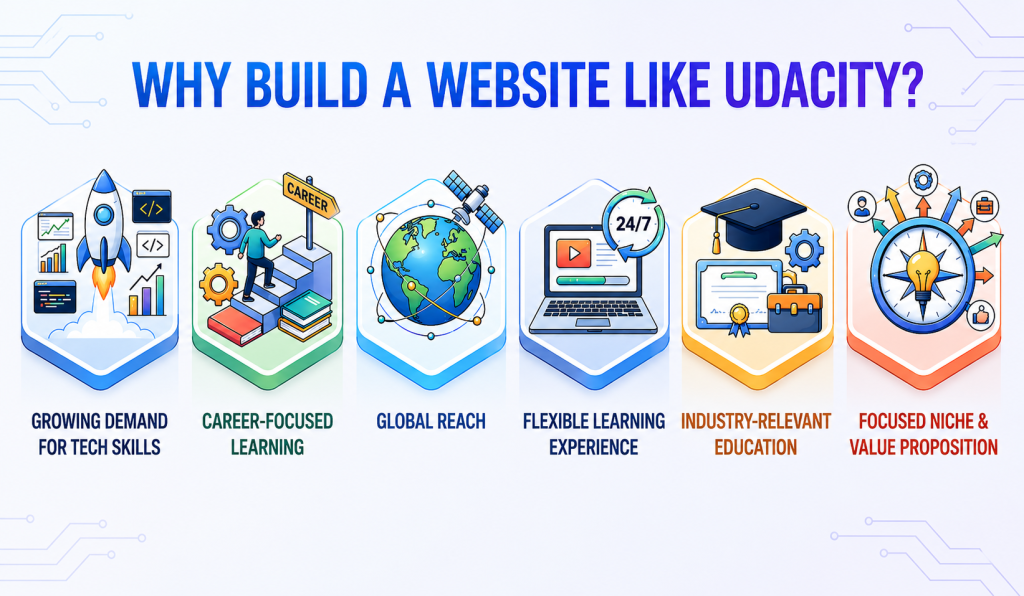
Here are some reasons to consider building a platform like Udacity:
1. Growing Demand for Tech Skills
Businesses increasingly need professionals with skills in AI, data science, cloud computing, and other emerging technologies, creating demand for specialized learning programs.
2. Career-Focused Learning
Learners are looking for flexible alternatives to traditional education that help them develop practical skills and prepare for career opportunities.
3. Global Reach
An online learning platform allows you to reach learners across different locations without the limitations of a physical classroom.
4. Flexible Learning Experience
Users can access learning materials and complete programs according to their own schedules, making online education convenient for students and working professionals.
5. Industry-Relevant Education
Focusing on in-demand skills allows you to create specialized programs that align with changing industry requirements and learner expectations.
These factors make it an attractive opportunity to build a website like Udacity with a focused niche, relevant learning programs, and a clear value proposition.
How to Create a Website Like Udacity: Step-by-Step Guide
Building a platform like Udacity requires more than adding online courses to a website. You need to define your target audience, create valuable learning programs, choose the right business model, and provide features that support both learning and career development.
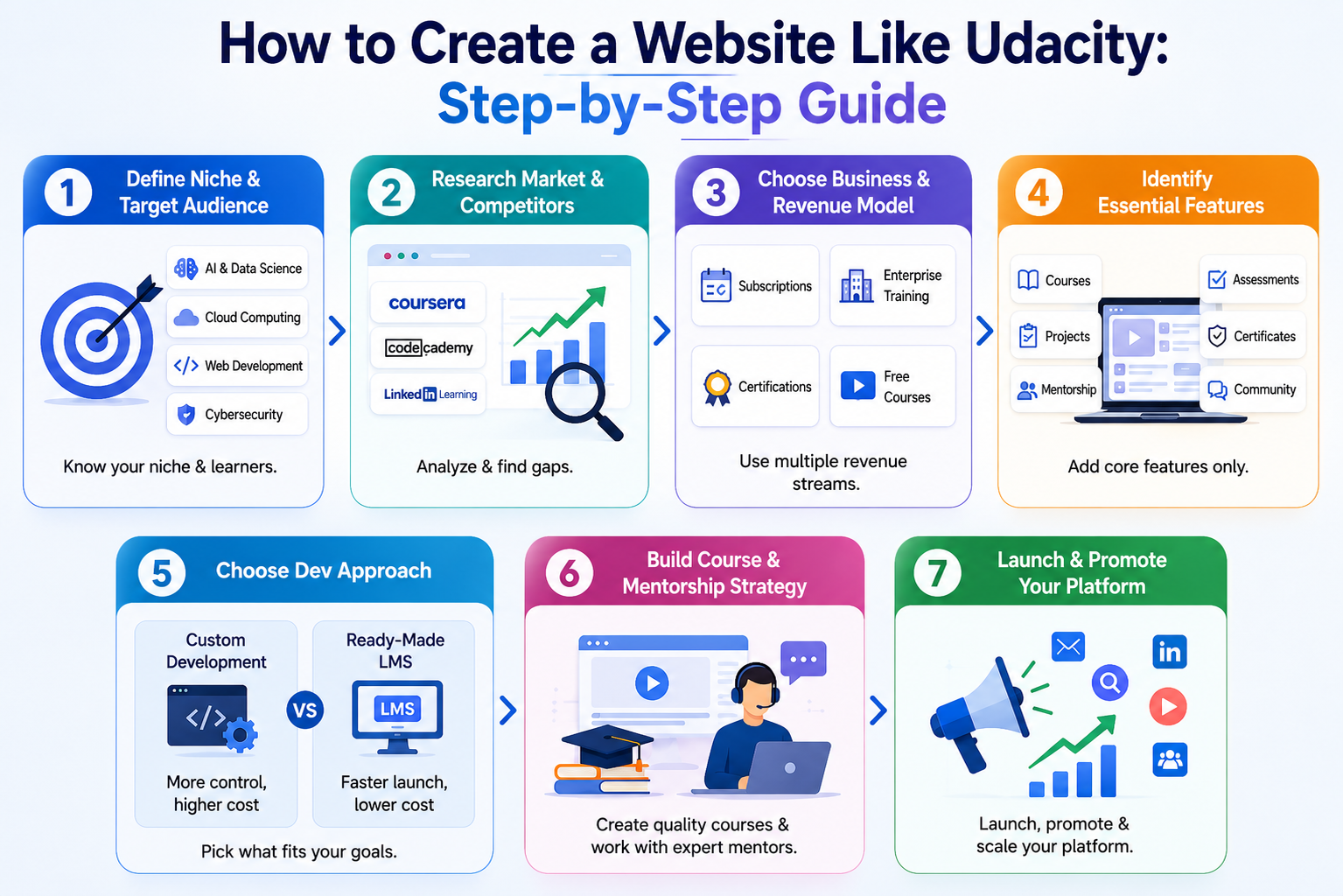
Here are the key steps to build your own Udacity-like platform:
Step 1: Define Your Niche and Target Audience
Start by choosing a specific area of learning instead of trying to cover every subject. A focused niche makes it easier to create relevant courses, attract the right learners, and differentiate your platform from larger competitors.
Some high-demand niches include:
- AI & Generative AI: For professionals, developers, and career switchers looking to build expertise in AI and large language models.
- Data Science: For aspiring data analysts, data scientists, and business intelligence professionals.
- Cloud Computing: For IT professionals seeking skills in platforms such as AWS and Azure.
- Web Development: For aspiring developers, freelancers, and learners looking to build technical skills.
- Cybersecurity: For IT professionals and organizations looking to strengthen cybersecurity expertise.
- Corporate Training: For businesses and HR teams focused on employee upskilling and professional development.
Once you select your niche, define your target audience based on their learning goals, skill level, professional background, and preferred learning format. This will help you plan your courses, pricing, and platform features around their actual needs.
Step 2: Research the Market and Competitors
After identifying your target audience, research the current market to understand what learners expect, industry trends and where ready-made platforms fall short.
Start by analyzing e-learning platforms such as Coursera, Codecademy, Treehouse, and LinkedIn Learning.
Compare them based on factors such as:
- Course structure and learning formats
- Pricing and subscription plans
- Mentorship and learner support
- Mobile accessibility and user experience
- Enterprise learning solutions
- Customer reviews and learner feedback
Beyond competitor analysis, validate market demand using tools like Google Trends, Semrush, and industry reports. Explore online communities such as Reddit, Quora, LinkedIn groups, and developer forums to identify common learner pain points, emerging skill demands, and features users wish platforms offered.
Use these insights to identify what works well, what users dislike, and where your platform can offer something different. This research will help you make informed decisions about your courses, features, pricing, and overall platform strategy.
Step 3: Choose a Business and Revenue Model
Before deciding how your platform will generate revenue, define how it will deliver value to learners and businesses. A website like Udacity typically follows a hybrid B2C and B2B business model, serving both individual learners and enterprise organizations.
- Individual Learning (B2C): Offer structured, self-paced learning programs with projects, mentor support, assessments, and industry-recognized certifications to help learners build job-ready skills.
- Enterprise Learning (B2B): Provide organizations with role-based learning programs, workforce upskilling, progress tracking, and reporting tools to train employees at scale.
Once you’ve established your business model, choose revenue streams that align with your target audience.
Revenue Model
- Subscription Plans: Offer monthly or annual subscriptions that provide access to structured learning paths, premium courses, and career-focused programs. Recurring subscriptions create predictable revenue while giving learners flexibility.
- Enterprise Training: Sell customized training programs and bulk licenses to organizations looking to upskill or reskill employees. Enterprise contracts often become a major source of long-term revenue.
- Career Services: Offer premium services such as resume reviews, interview preparation, portfolio guidance, and career coaching as part of higher-tier plans or bundled learning programs.
- Industry Certifications: Provide paid learning programs that include mentor support, project reviews, assessments, and certificates upon successful completion to help learners demonstrate their skills.
- Free Learning Resources: Offer selected introductory courses or learning materials for free to attract users, then monetize premium features such as mentorship, advanced programs, career support, and certifications.
A hybrid business and revenue model allows you to serve both individual learners and enterprise clients while building multiple revenue streams. As your platform grows, you can expand your course catalog, introduce premium services, and strengthen enterprise learning offerings to support long-term growth.
Step 4: Identify the Essential Features
Your platform should include the essential features needed to build a website like Udacity while delivering a simple, interactive, and engaging learning experience. Focus on the core functionality required to support learners, instructors, enterprise clients, and administrators.
- User Registration & Profiles: Enable learners to create accounts, manage their profiles, track enrollments, and access personalized dashboards.
- Course Management: Create, organize, and manage structured learning programs.
- Learning Paths: Guide learners through a predefined sequence of modules, projects, and assessments to build job-ready skills.
- Video-Based Learning: Deliver high-quality video lessons, downloadable resources, and interactive learning materials.
- Project Submission: Allow learners to submit assignments and projects for review.
- Assessments: Include quizzes and tests to evaluate learner progress.
- Mentorship Management: Help learners connect with mentors and receive expert guidance.
- Progress Tracking: Allow learners to monitor course completion and performance.
- Certificate Generation: Automatically issue certificates after learners successfully complete program requirements
- Payment Management: Support subscriptions, course purchases, and other payment options.
- Discussion Forums & Community: Enable discussions and peer interaction among learners.
- Admin Dashboard: Manage users, courses, enrollments, payments, analytics, and platform performance from a centralized interface.
Advanced features such as AI-powered recommendations, AI learning assistance, and career tools can be added as your platform grows.
Step 5: Choose Between Custom Development and a Ready-Made LMS
The development approach you choose will affect your platform’s cost, launch timeline, customization, and scalability. Consider your budget and business goals before making a decision.
Custom Development: Building from scratch provides greater control over the platform’s design, features, and functionality. However, it requires a higher investment and a longer development timeline. This approach is suitable for businesses that need highly customized solutions.
Ready-Made LMS: A ready-made LMS provides pre-built learning and management features that can be customized to match your business requirements. It can help reduce development time and initial investment, making it a practical option for startups and businesses looking to launch quickly.
For example, Pinlearn’s LMS clone script offers a ready-made solution that businesses can customize based on their e-learning requirements.
The right approach depends on your business goals, budget, and desired level of customization.
Step 6: Build Your Course and Mentorship Strategy
The quality of your learning programs and expert support plays a major role in the success of your platform. A website like Udacity focuses on structured, career-oriented learning by combining expert-led content, practical projects, project reviews, and learner support to help users build job-ready skills.
Course Development
Start by creating 1-2 flagship learning programs based on your chosen niche and target audience. Each program should include video lessons, practical projects, quizzes or assessments, and clearly defined learning outcomes that help learners build practical skills.
Collaborate with industry professionals to develop the curriculum and ensure the content stays aligned with current technologies, industry trends, and employer expectations. Regularly updating your programs also helps keep them relevant.
Instructor and Reviewer Recruitment
Recruit experienced professionals to create course content and review learner projects. You can find qualified instructors and reviewers through LinkedIn, professional communities, industry networks, and technology organizations.
Before onboarding, evaluate their technical expertise, industry experience, and ability to provide clear, constructive feedback.
Learner Support
Provide learners with reliable support throughout their learning journey. This can include discussion forums, FAQs, technical assistance, and access to instructors or reviewers for course-related questions. A well-structured support system helps improve learner engagement and course completion rates.
Project Reviews and Feedback
Practical projects are a key part of a Udacity-like learning experience. Implement a structured review process where learners submit projects for evaluation and receive detailed, actionable feedback. This helps learners strengthen their skills through real-world application while maintaining consistent learning standards.
Compensation Model
Compensate instructors and project reviewers based on their responsibilities, such as course development, project reviews, content updates, or learner support. Offering competitive compensation and flexible engagement models helps attract experienced professionals and maintain the quality of your learning programs.
Starting with a small team of experienced instructors and reviewers, along with a limited number of high-quality learning programs, allows you to maintain consistent learning standards while gradually expanding your platform.
Step 7: Launch and Promote Your Platform
With your platform, courses, and mentorship system ready, focus on attracting your first learners and building awareness. A phased launch strategy can help you test the platform, collect feedback, and improve the learning experience before expanding.
Pre-Launch
Start with a small group of beta users to test your courses, features, and mentorship experience. Collect feedback, identify issues, and gather testimonials from early learners.
Official Launch
Promote your platform through content marketing, social media, email campaigns, search engine optimization, and paid advertising. Create useful content around the skills and career topics your target audience is interested in to attract potential learners.
Growth
Introduce referral programs and partnerships to expand your reach. You can also connect with universities, training organizations, and technology companies to promote your programs and reach new audiences. Building an engaged learner community through discussion forums, newsletters, and online events can also improve learner retention and encourage word-of-mouth referrals
Scale
Once you have established a steady user base, expand your course catalog and explore enterprise training opportunities. You can also build partnerships with employers to create career opportunities for learners and strengthen your platform’s value proposition.
A gradual approach allows you to validate your learning model, understand learner needs, and scale your platform based on real user demand.
How Much Does It Cost to Build a Website Like Udacity?
The cost to build a website like Udacity depends on the development approach, platform features, customization, content creation, and integrations.
Ready-Made LMS
A ready-made LMS can reduce the initial development investment by providing pre-built learning and management functionality. The software license price varies by provider and plan, while customization, integrations, branding, and other requirements can increase the overall launch cost.
For businesses looking for a ready-made option, Pinlearn’s LMS clone script offers one-time pricing plans, with the professional plan priced at $1,499. Additional customization and business requirements may affect the overall investment.
Custom Development
Building a fully customized platform from scratch generally requires a higher investment. The development cost can range from $150,000 to $300,000 or more, depending on the platform’s complexity, features, technology stack, and development team.
Additional expenses may include:
- Course and content development
- Instructor and reviewer recruitment
- Payment gateway integration
- Infrastructure (Cloud Hosting, Databases, Storage, CDN, and Security)
- Marketing and user acquisition
- Ongoing maintenance and technical support
Choosing between a ready-made LMS and custom development depends on your budget, business goals, and desired level of customization.
Recommended Tech Stack for a Website Like Udacity
The technology stack you choose should support a smooth learning experience, reliable performance, and future scalability. The exact technologies may vary depending on your platform’s features and development approach.
- Frontend: React or Next.js for building responsive and interactive user interfaces.
- Backend: Node.js or Python Django for managing APIs, business logic, and user accounts.
- Database: MySQL for storing user accounts, course information, enrollments, learning progress, assessments, and transaction data. Redis can be used for session management, caching, background job processing, and improving overall application performance.
- Video Hosting: Vimeo or Wistia for hosting and delivering online course videos.
- File Storage: AWS S3 or Google Cloud Storage for course materials, assignments, and certificates.
- Live Mentoring: Zoom API or Agora for live classes and mentor sessions.
- Payments: Stripe or PayPal for managing subscriptions and online payments.
- Cloud Hosting: AWS or Google Cloud for hosting and scaling the platform.
- Email & Notifications: SendGrid for transactional emails and learner notifications.
- Analytics: Mixpanel or Google Analytics for tracking user behavior and platform performance.
For a ready-made LMS, many of these technologies and integrations may already be available, reducing the need for separate development and technical setup.
With custom development, you can choose technologies based on your platform’s specific features, budget, scalability requirements, and long-term goals.
Conclusion
Building a website like Udacity requires a combination of structured learning programs, practical projects, learner support, and a sustainable business model. Whether you choose a ready-made LMS or custom development, selecting the right approach depends on your budget, scalability goals, and customization requirements.
As your platform grows, you can expand your course catalog, introduce workforce learning programs, and add advanced features to deliver greater value to both individual learners and organizations.
If you’re looking for a faster way to launch an online learning platform, a ready-made LMS such as Pinlearn’s LMS clone script can be one option to consider before investing in custom development.
FAQ Related to How to Create a Website Like Udacity
1. How much does it cost to build a website like Udacity?
A ready-made LMS can have a lower upfront cost than custom development, depending on the provider, license, customization, and integrations required. Custom development can range from $150,000-$300,000+ for a complex platform.
2. How long does it take to build a website like Udacity?
A ready-made LMS can be launched in 4-8 weeks, while custom development typically takes 9-12 months.
3. What is the best way to build a website like Udacity?
A ready-made LMS is ideal for launching quickly and testing your idea. Once your platform gains users and validates product-market fit, you can consider moving to custom development for greater flexibility and scalability.