
Automated Student Onboarding: 9 Strategies to Boost Experience & Reduce Drop-Off
First impressions matter and that holds true for student onboarding as well! Whether you’re onboarding a new student to an online school, or welcoming a learner onto an e-learning platform, the student onboarding experience shapes their learning path!
A good experience makes them feel excited, informed and also feel connected! On the other hand, poor onboarding makes them feel overwhelmed, lost, and quit before reaching the “Aha! moment.” Automating onboarding streamlines the process, giving students focused attention.
In this post, we break down 9 powerful ways to automate student onboarding, and explore how top industry players decoded the onboarding script! So, are you ready to build a remarkable onboarding experience for your students?
What is Student Onboarding?
Student onboarding is a streamlined process that guides students to become familiar with educational institutions or platforms. Typically, resources, information, and support are provided to guide them to meet their expected goals.
Key Elements of Student Onboarding:
- Welcome Email
- Essential Dates, Schedule, Document Submission (for universities)
- Orientation
- Account Set Up
- Completing Personalization Preferences
- Platform Walkthrough & Guiding through Resources
- Dashboard & Reporting
- Introductory Course
- Check-in & Feedback
A seamless onboarding significantly increases the chances of student success. A great onboarding flow helps students feel excited, get acquainted, clear expectations, and get hands-on support to get started.
9 Powerful Strategies to Automate Student Onboarding
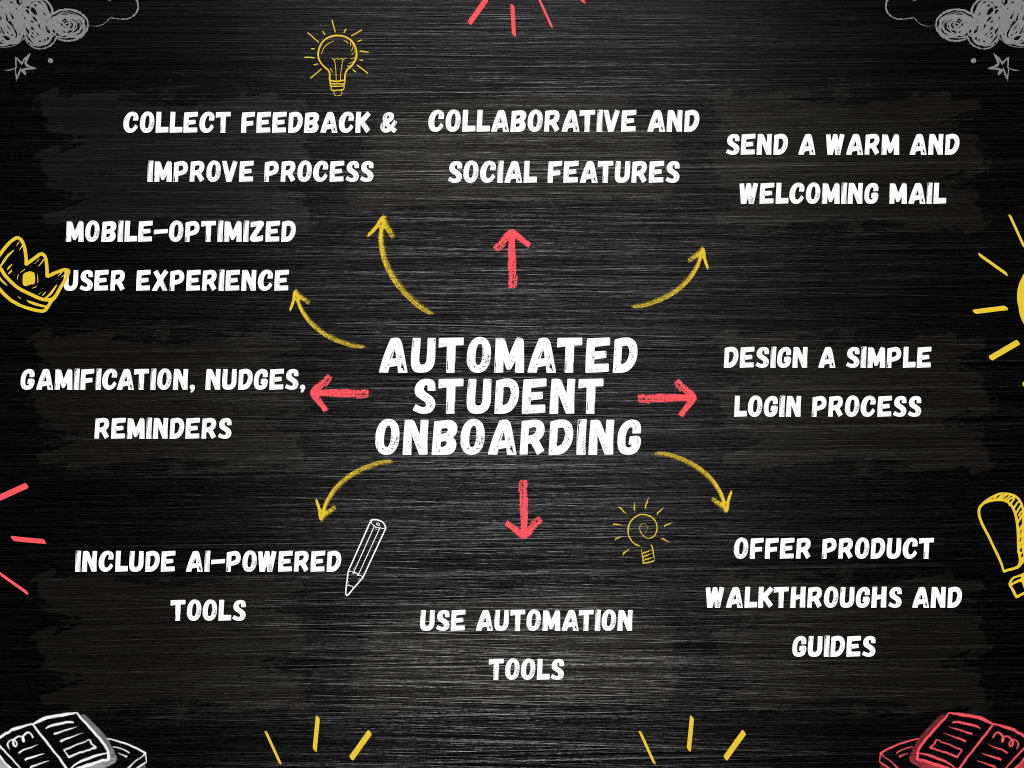
1. Send a Warm and Welcoming Mail
A warm, welcoming email is your student’s first interaction with your platform. Whether you’re a first-time student or parent, a welcome mail guides you on to the next steps.
Sending out a personalized email to your students makes them feel valued and engaged to start their new academic journey.
How to Automate Personalized Welcome Sequences?
- Identify your audience, identify goals, and map out the essential tasks
- Craft the detailed steps: welcome, engagement, progress check-in, feedback email, and milestone celebration
- Trigger emails on first login
- Leverage email tools (Mailchimp, ConvertKit, and ActiveCampaign) and automation tools (Hubspot); analytics to schedule emails
- Personalize email with name, grade, goal, and tutor name
- Track metrics like email open rates, click-through rates, and common drop-off points
A welcome is your first and most important impression, so make the best use of it! Add platform highlights, guides, and activation hooks to keep students motivated.
2. Design a Simple Login Process
A simple and hassle-free login is a great starting point for seamless onboarding. If the login is easy, intuitive, and frictionless, students are going to stick with the platform for long.
For example, social logins are more convenient and reduce friction.
How to create a simple and effective login process?
- Include one-click or minimal logins
- Social logins for Google, Facebook, and other popular accounts allow access from any device
- Prioritize mobile-first experience with large input boxes, clear error messages, and auto-reading OTP
- Use passwordless login based on OTP
- Ask for only essential information and avoid long forms
Simple interface, social logins, and essential information ensure you make a smart move and reduce drop-offs!
3. Offer Product Walkthroughs and Guides
Your first moments with users matter, so why not try product-led onboarding? It involves guiding users to find value in your product from the start.
From the moment the student signs up, you can include product demos or step-by-step guides to get things in line!
How to lead students with product onboarding?
- Include short product tours highlighting top platform features, dashboard, and key interfaces
- Trigger emails with walkthroughs and next steps based on specific actions
- Include getting started checklists in the dashboards
- Add tooltips explaining essential features for first-time users
- Include downloadable resources like lesson planners or guides
- Interactive walkthroughs where users perform tasks ensure students are on the same page
A product walkthrough reduces confusion and leads students with confidence.
4. Use Automation Tools for Seamless Workflows
Choosing the right automation tool helps in a smooth transition for new students into their educational platforms. It cuts down on delays, administrative costs, and provides a great learning experience.
Common challenges while onboarding include documentation management, integrating with existing systems, seamless communication, and technical support.
How to pick the right automation tools?
- Determine your needs: number of students, documents, user flow needs, etc.
- Choose scalable and flexible software that supports business growth
- Ensure the tool provider offers hands-on technical support
- Prioritize security of student data and compliance needs
- Balance the budget with the utility of the automation tool
LMS with built-in automation (360 Learning, TalentLMS), Google Classroom, Gradelink SIS, and Userguiding are some automation tools. Google Workspace for Education involves Google Forms, Google Docs, and Google Classroom Management Tools for easy and quick student onboarding.
5. Leverage AI for Personalized Onboarding Support
Multi-faceted AI technology has its implications for automating the student onboarding process as well. For example, virtual assistants and chatbots can provide personalized support to new students. They can answer common questions and cater to individual needs without a staff member.
How to Integrate AI in Personalized Onboarding Flow?
- Generative AI for creating tailored tutorials, images, or other resources based on individual needs
- Use virtual assistants and chatbots to answer queries, offer guides, and provide next steps
- Personalized learning experiences and additional support for students who need help
- Build customized email, reminders, and SMS sequences based on student behaviour
Predictive intelligence helps AI to identify students who are likely to drop off and provide them with early guidance.
6. Include Gamification, Gentle Reminders and Nudges
Gamification inflows and gentle nudges keep learners motivated to stay on the platform. Want your students to get addicted to your platform? Don’t stop communicating after the first login!
Build a strong rapport with regular communication and keep track of their progress. Remember to humanize your communication with stories and humor.
Strategies for gamification inflows and subtle reminders:
- Include progress bars, badges, points, rewards and streaks on unlocking each onboarding step
- Effective nudges like “New AI course drop?” or “Great work! You’re almost there” keep learners engaged
- Send timely reminders about their next session, course progress, or profile completion to keep coming back
This robust trio of — gamification, reminders and nudges builds the right learning environment. And leads students a step further to success!
7. Optimize for Mobile User Experience
The most common mistake e-learning platforms make is assuming web and mobile onboarding is the same. But the truth is, both are different!
Mobile users demand a more easy, intuitive and quick experience.
How to deliver a mobile-app optimized onboarding experience?
- Value micro-interactions like tooltips and guide students with short and direct messages
- Gamify with rewards, in-app messages, and progress bars to get tasks completed
- Allow self-discovery with skip, snooze, or a 3 to 4 step onboarding journey
- Focus on essential features and interfaces of your platform
- Ask questions on learner preferences and provide tailored onboarding content
A great mobile onboarding experience is all about user satisfaction. So, don’t rush or keep it too slow; let students steer their onboarding journey!
8. Collaborative and Social Features
Collaborative and social features build a powerful onboarding experience from day one. Students are entering a whole new educational journey. Leading with meaningful relationships boosts learning outcomes and retention.
Different ideas for implementing collaborative onboarding:
- Build dedicated community forums and discussion boards with FAQs, rules and resources
- Create small onboarding cohorts and engage in peer introduction
- Member spotlight and reward top contributors with badges
- Host live welcome sessions and community connect events
Collaborative onboarding builds a sense of belonging and confidence from the start. This, in turn, reduces drop-offs and keeps the engagement levels up!
9. Collect Feedback and Improve the Onboarding Process
Listen to your existing students when they speak up about their onboarding experience. Don’t dwell much on the positive ones; instead, focus on how to get over the negative points.
Use surveys, feedback forms or interviews to refine your onboarding process. The goal is to find what’s working and what’s not, and accordingly tweak the onboarding steps.
Make your students feel valued and address their common challenges. This way, you refine your onboarding process with every new student! Micro steps — is your way to a seamless onboarding experience!
A memorable onboarding experience goes a long way to build your loyal student base!
Why Automate Student Onboarding?
Here are the key reasons to automate the student onboarding process:
-
Eliminate Manual Enrollment and Course Assignment Tasks
Automated onboarding eliminates the need for manual enrollment and verification. This reduces the administrative burden and creates a seamless onboarding experience.
-
Reduce Drop-offs
A guided onboarding process provides clear instructions on how to get started, platform features, and how to progress. When students know the next step, they are less likely to drop off.
-
Enhance Student Engagement and Retention
Whether it’s a warm welcome message, reminders, or gentle nudges, effective onboarding engages students and makes the platform less overwhelming.
-
Better Learning Outcomes
When the students are adept with the platform, know how to access resources, show active participation and seek feedback, they are more likely to meet their learning goals.
E-learning Platforms That Nailed Automated Student Onboarding
Duolingo: Best Gamified Onboarding Experience
Duolingo has mastered the art of gamifying language learning thanks to its humorous green mascot, endless streak challenges and modern interface. Right from login to lessons and adaptive tests, the platform keeps engagement and fun elements intact!
It embraces the Hero’s Journey framework, where the learner (hero) faces challenges (questions) and finally completes the language quest. And all this alongside the feisty mascot that motivates learners on the wild ride!
The onboarding journey begins with exploring the product, delaying registration until the end. Users set up goals, take up translation exercises and quizzes, and finally sign up with the platform.
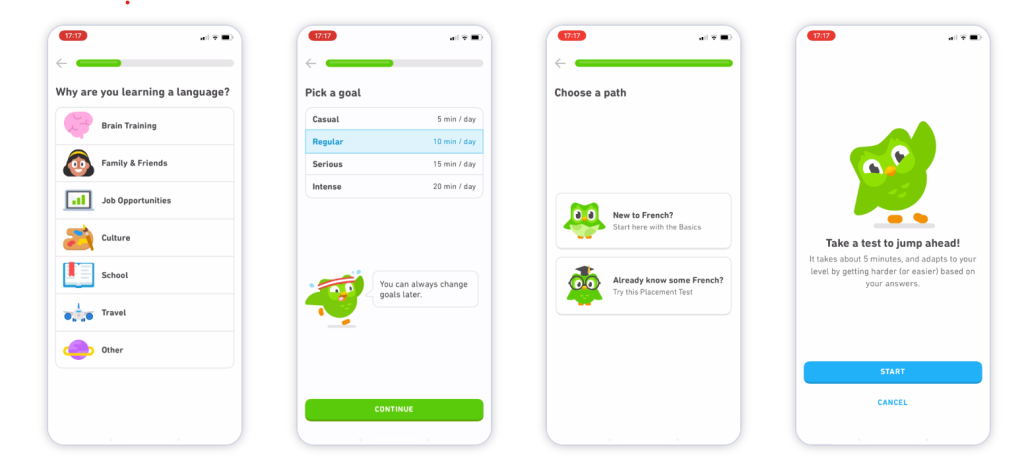
Takeaway: Easy, thoughtful and personalized onboarding based on learners’ goals, skill level and preferences. Great UX and prompts at the right moment reduce friction and drop-offs.
360 Learning
360 Learning leads with an impactful collaborative onboarding experience. It employs automated user management flows, personalized paths,cohort-based onboarding and role-specific paths.
For example, if an organization is onboarding cohorts, the platform blends it with automation and decentralized authoring tools. This speeds up the process, yet keeps personalization intact.
With the platform, onboarding happens in three steps: pre-onboarding, induction and role-specific onboarding. Further, discussion threads, community feedback, peer coaching and course creation reduce the ramp-up time.
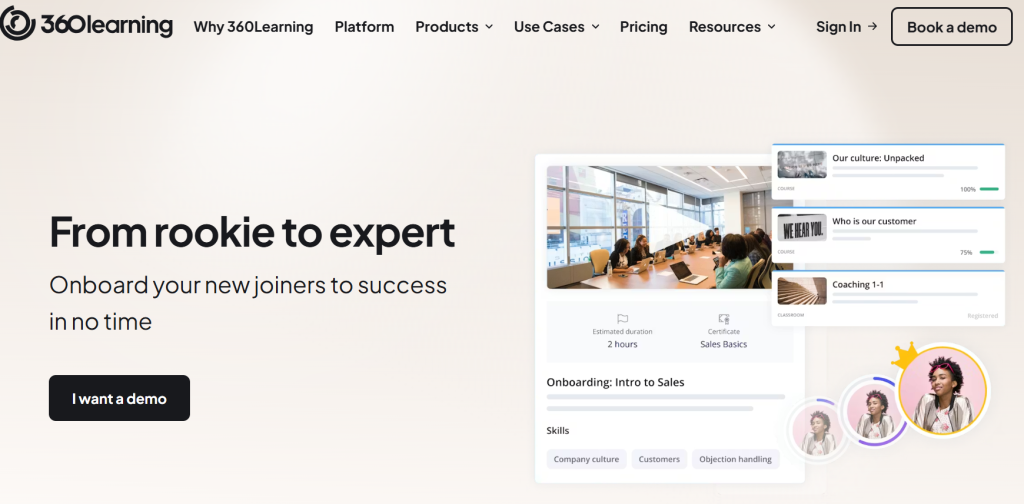
Takeaway: Shows how collaborative and social onboarding helps users transition from rookie to expert. Great blend of automation, structure, and still nurturing human connections at its core.
Wrapping Off
Delivering a great student onboarding experience is to make them feel valued and ease the learning curve! Modern platforms focus on automated workflows for custom experiences to scale onboarding.
Onboarding is an ongoing experience, so track key metrics as learners progress through the platform flows. Choose the right onboarding tool that values learners’ needs and preferences. Find innovative ways to blend onboarding with AI, collaborative learning, and gamification!
FAQ-Related to Automated Student Onboarding
1. What is the student onboarding process?
The student onboarding process is a structured, guided process that helps students become familiar with educational institutions or platforms. Typically, resources, information and support are provided to guide them to meet their expected goals.
2. What are the top features for a seamless onboarding process?
Here are the top onboarding features for an e-learning platform:
- Interactive product walkthroughs and guides
- Personalized learning paths
- Welcome email sequences
- Auto-assigned tutors or courses
- Progress bars, tooltips and gentle nudges
- Mobile-optimized design
2. Why do students drop off during onboarding?
The common reasons to drop off during onboarding include:
- No clear onboarding instructions
- Vague and disoriented dashboards
- Lack of personalized learning paths
- Poor interface design
- Lengthy onboarding process